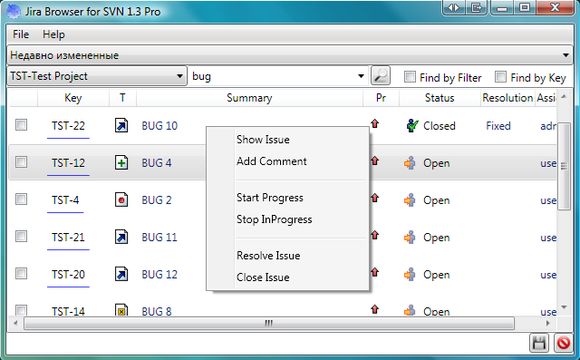

JiraBrowser for Subversion
Version 1.3
Shareware
$15.00
0 downloads
JiraBrowser - Jira Issue Tracker Plugin for
TortoiseSVN (subversion) to Jira - allow select issues
as comment from TortoiseSVN when you commit changes.
The list of tasks is loaded from Jira.
Can be used in MS Visual Studio, together with
VisualSVN.
Short installation guide.
1. Install
2. Add this plugin for your working copy path:
- Open TortoiseSVN\settings\Issue TrackerIntegration.
- Press Add
- Set your working copy path and select
JiraBrowserPlg.JiraBrowserPlugin
3. When you commit chenges in your working copy, you
can select issues when you press "choose issues"
button.
4. Set Jira access settings in JiraBrowserPlugin in
File\Settings and text output pattern.
5. Create custom filters in Jira
TortoiseSVN (subversion) to Jira - allow select issues
as comment from TortoiseSVN when you commit changes.
The list of tasks is loaded from Jira.
Can be used in MS Visual Studio, together with
VisualSVN.
Short installation guide.
1. Install
2. Add this plugin for your working copy path:
- Open TortoiseSVN\settings\Issue TrackerIntegration.
- Press Add
- Set your working copy path and select
JiraBrowserPlg.JiraBrowserPlugin
3. When you commit chenges in your working copy, you
can select issues when you press "choose issues"
button.
4. Set Jira access settings in JiraBrowserPlugin in
File\Settings and text output pattern.
5. Create custom filters in Jira
Program details
Publisher
Cry DevE-mail
Contact the publisherPlatforms
Windows XPFile size
412 KBFile date
4/26/2009License
SharewareInstallation
Install & UninstallRecord updated
4/26/2009


