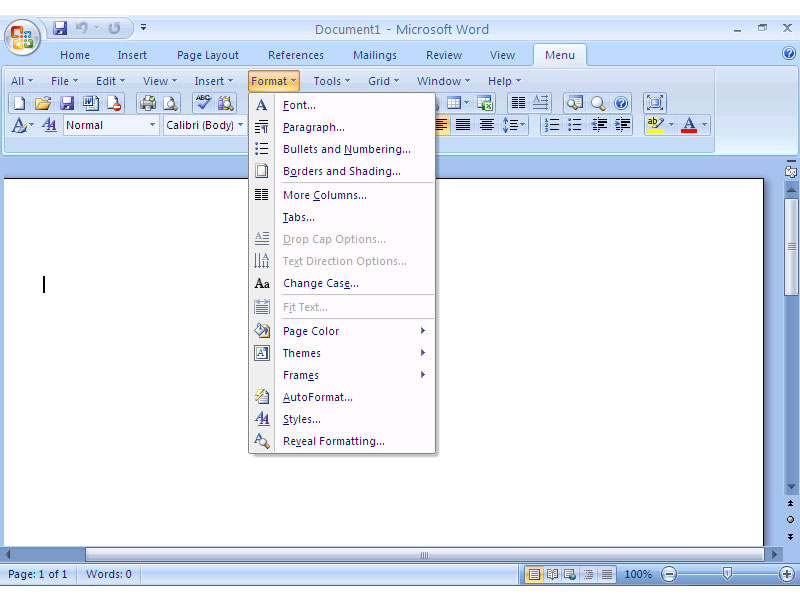

Classic Menu for Word 2007
Version 7.00
Shareware
$15.99
0 downloads
Bring back the classic menus and toolbars of Word 2003
to Microsoft Word 2007. You can use Word 2007
immediately without any training or tutorials if you
used Word 2003 before. The software allows you to work
with Word 2007 as if it were Word 2003.
All the new features in Microsoft Word 2007 have been
added into the Main Menu, Standard Toolbar and
Formatting Toolbar.
User can browse the whole menus with keyboard
shortcuts (insert Q into the original shortcuts of
Office 2003. For example: press Alt + T to open
the "Tools" menu in Word 2003, you just need to press
Alt, Q, T to open the "Tools" menu in Word 2007).
Not only the main menu, standard and formatting
toolbars, the new version offers more toolbars such as
Comments, Proofing, Tracking, Mailings and Reference.
You can display these toolbars as needed.
Easy to show or hide build-in tabs on the Ribbon. Easy
to show or hide the classic menus and toolbars. You
can change the position of classic menus.
to Microsoft Word 2007. You can use Word 2007
immediately without any training or tutorials if you
used Word 2003 before. The software allows you to work
with Word 2007 as if it were Word 2003.
All the new features in Microsoft Word 2007 have been
added into the Main Menu, Standard Toolbar and
Formatting Toolbar.
User can browse the whole menus with keyboard
shortcuts (insert Q into the original shortcuts of
Office 2003. For example: press Alt + T to open
the "Tools" menu in Word 2003, you just need to press
Alt, Q, T to open the "Tools" menu in Word 2007).
Not only the main menu, standard and formatting
toolbars, the new version offers more toolbars such as
Comments, Proofing, Tracking, Mailings and Reference.
You can display these toolbars as needed.
Easy to show or hide build-in tabs on the Ribbon. Easy
to show or hide the classic menus and toolbars. You
can change the position of classic menus.
Program details
Publisher
Lin JieE-mail
Contact the publisherPlatforms
Windows XPFile size
3935 KBFile date
10/3/2012License
SharewareInstallation
Install & UninstallRecord updated
3/16/2012