
Task Scheduler
Version 1.0
Shareware
$29.00
1 downloads
The question might be asked, since Windows already has
a task scheduling utility, why would anyone need
another one? The answer to that question is (1) ease of
use and (2) enhanced capabilities.
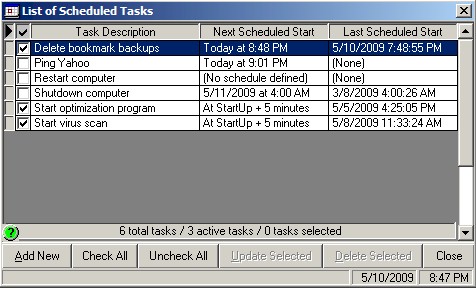
The Purple Parrot Task Scheduler allows you to quickly
and easily define tasks to be executed on your
computer, and then to select which of those tasks are
currently active. For example, to temporarily disable a
task in the Windows scheduler requires approximately
six steps, while our scheduler only requires one step
-> click on the check box next to a task to disable or
enable it. That's all there is to it.
Additionally, several predefined tasks are available to
further facilitate task creation. The current list of
predefined tasks are as follows:
• Set an alarm/reminder
• Empty the recycle bin
• Delete a file(s)
• Clear a folder
• Delete a folder
• Defrag a disk drive
• Close a program
• Ping an IP address
• Logoff the current user
• Restart the computer
• Turn off (shutdown) the computer
Two more significant improvements over the Windows
scheduler have been provided:
(1) There's no need to enter a Windows user ID and
password in order to schedule a task
(2) You can now send or show a notification of task
execution by way of an e-mail or a simple on-screen message
a task scheduling utility, why would anyone need
another one? The answer to that question is (1) ease of
use and (2) enhanced capabilities.
The Purple Parrot Task Scheduler allows you to quickly
and easily define tasks to be executed on your
computer, and then to select which of those tasks are
currently active. For example, to temporarily disable a
task in the Windows scheduler requires approximately
six steps, while our scheduler only requires one step
-> click on the check box next to a task to disable or
enable it. That's all there is to it.
Additionally, several predefined tasks are available to
further facilitate task creation. The current list of
predefined tasks are as follows:
• Set an alarm/reminder
• Empty the recycle bin
• Delete a file(s)
• Clear a folder
• Delete a folder
• Defrag a disk drive
• Close a program
• Ping an IP address
• Logoff the current user
• Restart the computer
• Turn off (shutdown) the computer
Two more significant improvements over the Windows
scheduler have been provided:
(1) There's no need to enter a Windows user ID and
password in order to schedule a task
(2) You can now send or show a notification of task
execution by way of an e-mail or a simple on-screen message
Program details
Publisher
Purple Parrot ProgramsE-mail
Contact the publisherPlatforms
Windows 95<br>Windows 98<br>Windows ME<br>Windows File size
11900 KBFile date
5/13/2009License
SharewareExpires after
30 daysInstallation
Install & UninstallRecord updated
5/14/2009


