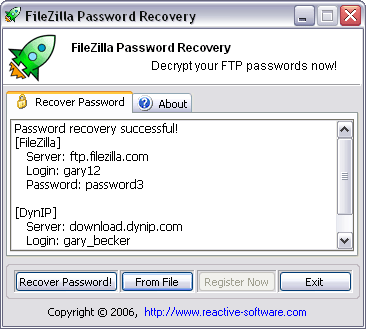

Password Recovery for FileZilla
Version 1.05.04.09
Shareware
$19.95
0 downloads
FileZilla Password Recovery is a program that instantly recovers and decrypts FTP account information including passwords for all FTP sites that have been added in FileZilla Client. Proxy server passwords are recovered (both Socks and FTP proxy). Admin password of FileZilla Server is also shown. All versions of FileZilla server and client are supported (both registry and .xml account information storage methods are identified), recovery of external .xml files is possible.
Functionality of FileZilla password recovery - in other words, what this tool can do:
* All versions of FileZilla are supported
* Support for multiple FTP accounts
* Socks proxy password recovered
* FTP proxy password decrypted
* Both registry and .xml account storage methods are supported
* External .xml file is supported
* Drap-n-drop of account files supported
Even if you have already un-installed FileZilla, there is still a good chance that you can recover the passwords for the FTP accounts. Firstly, run the program, click "Recover password!" button and see if the program manages to automatically find and decrypt ftp passwords. If this doesn't work, use the "From File" button in FileZilla password recovery and browse to the folder where FileZilla used to be installed (usually, in C:\Program Files\FileZilla).
Functionality of FileZilla password recovery - in other words, what this tool can do:
* All versions of FileZilla are supported
* Support for multiple FTP accounts
* Socks proxy password recovered
* FTP proxy password decrypted
* Both registry and .xml account storage methods are supported
* External .xml file is supported
* Drap-n-drop of account files supported
Even if you have already un-installed FileZilla, there is still a good chance that you can recover the passwords for the FTP accounts. Firstly, run the program, click "Recover password!" button and see if the program manages to automatically find and decrypt ftp passwords. If this doesn't work, use the "From File" button in FileZilla password recovery and browse to the folder where FileZilla used to be installed (usually, in C:\Program Files\FileZilla).
Program details
Publisher
Reactive SoftwareE-mail
Contact the publisherPlatforms
Windows 95<br>Windows 98<br>Windows ME<br>Windows File size
296 KBFile date
5/4/2009License
SharewareInstallation
Install & UninstallRecord updated
5/14/2009


