
AVCWare iPod touch Video Converter
Version 6.0.9.0826
Shareware
$19.95
0 downloads
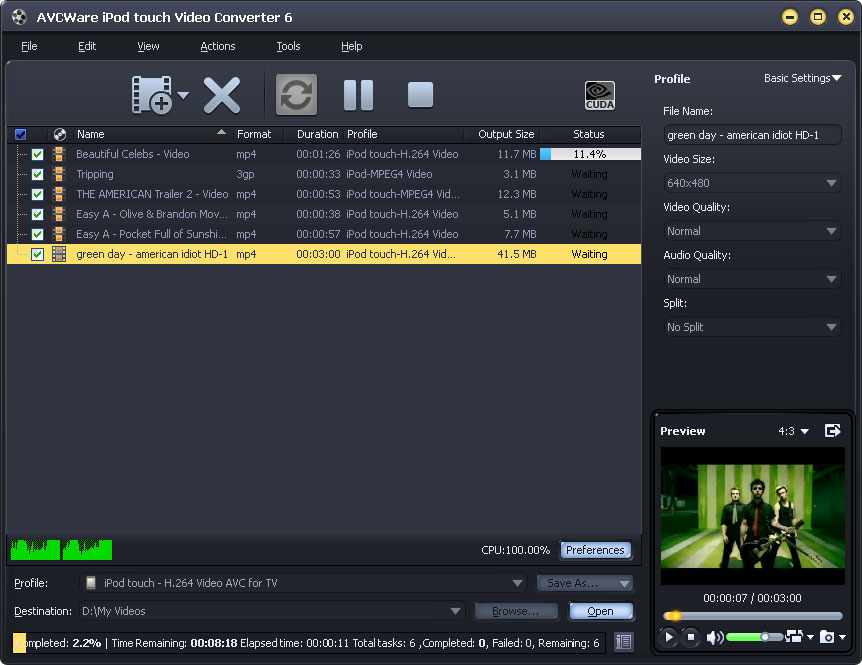
AVCWare iPod Touch Video Converter is an excellent
video to iPod converter, which can convert videos to
iPod video and audio formats, and then let you easily
enjoy music and video on iPod player. Moreover, this
iPod Converter supports batch process and convert
multiple videos to iPod at a time, thus the fast
conversion speed and excellent output quality can
exactly meet your needs.
Inputs: FLV, WMV, WMA, AVI, MPG, MPEG, RMVB, MKV, MTS,
M2TS, MOD, RM, RA, MOV, QT, MP4, M4V, DV, DAT, MP3,
AAC, etc.
Outputs: iPod video, MP3, M4A, WAV, AAC, etc.
Features:
1.All types of iPod are supported, such as iPod, iPod
Touch, iPod Classic, iPod nano, iPod shuffle, iPod
Mini, even iPhone, Apple TV.
2.Support batch video to iPod process and convert
multiple videos to iPod at a time.
3.The software works on multithreading and batch
process that makes your video to iPod conversion
faster and quicker in converting.
4.Split a large file into several small ones by the
default or customized split time/size.
5.Only convert the wanted part from a video by setting
the part’s duration and start time and removing the
unwanted parts before conversion.
6.Provide the general and advanced settings for
anyone: use the preset profiles to convert or adjust
output parameter to meet your unique demands. You can
also save the modified profile as a new one for future
use.
7.Play the loaded video/audio files with the built-in
resizable player with 4:3 or 16:9 zoom mode (it can
also be used as a stand-alone player); take snapshots
anytime during playing.
8.Allow you to manage your system power; automatically
detect CPU; run this iPod touch converter in
background to get more resource for more important
tasks.
9.Preset the after conversion action from hibernate,
standby, shutdown or exit and the software will
automatically do it after conversion is done.
10.Multilingual interfaces are provides including
German, English, Japanese, Spanish, French and Chinese.
video to iPod converter, which can convert videos to
iPod video and audio formats, and then let you easily
enjoy music and video on iPod player. Moreover, this
iPod Converter supports batch process and convert
multiple videos to iPod at a time, thus the fast
conversion speed and excellent output quality can
exactly meet your needs.
Inputs: FLV, WMV, WMA, AVI, MPG, MPEG, RMVB, MKV, MTS,
M2TS, MOD, RM, RA, MOV, QT, MP4, M4V, DV, DAT, MP3,
AAC, etc.
Outputs: iPod video, MP3, M4A, WAV, AAC, etc.
Features:
1.All types of iPod are supported, such as iPod, iPod
Touch, iPod Classic, iPod nano, iPod shuffle, iPod
Mini, even iPhone, Apple TV.
2.Support batch video to iPod process and convert
multiple videos to iPod at a time.
3.The software works on multithreading and batch
process that makes your video to iPod conversion
faster and quicker in converting.
4.Split a large file into several small ones by the
default or customized split time/size.
5.Only convert the wanted part from a video by setting
the part’s duration and start time and removing the
unwanted parts before conversion.
6.Provide the general and advanced settings for
anyone: use the preset profiles to convert or adjust
output parameter to meet your unique demands. You can
also save the modified profile as a new one for future
use.
7.Play the loaded video/audio files with the built-in
resizable player with 4:3 or 16:9 zoom mode (it can
also be used as a stand-alone player); take snapshots
anytime during playing.
8.Allow you to manage your system power; automatically
detect CPU; run this iPod touch converter in
background to get more resource for more important
tasks.
9.Preset the after conversion action from hibernate,
standby, shutdown or exit and the software will
automatically do it after conversion is done.
10.Multilingual interfaces are provides including
German, English, Japanese, Spanish, French and Chinese.
Program details
Publisher
AVCWare Software StudioE-mail
Contact the publisherPlatforms
Windows XPFile size
29198 KBFile date
9/16/2010License
SharewareInstallation
Install & UninstallRecord updated
10/12/2010