
Keyboard Shortcut
Version 1.0
Shareware
$5.00
0 downloads
Open Programs and pass command line arguments with a
simple key press on the keyboard. Create Shortcuts /
Hot Keys to Launch applications / open document files
by pressing user defined hot key / keyboard shortcut.
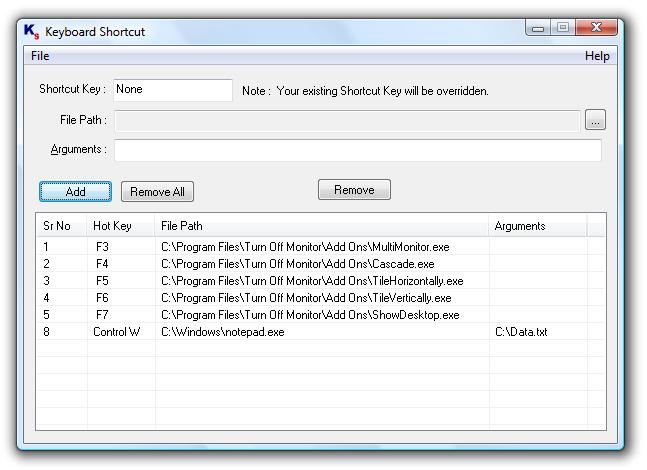
Keyboard Shortcuts created in this utility are
displayed in a list which can be helpful to view list
of keyboard shortcuts along with shortcut key & the
program / document for which they are configured. You
can remove previously defined keyboard shortcut(s)
from the main screen of the application. Keyboard
Shortcut Utility has no Nagging popups and the utility
starts in system tray as an icon & does not occupies
space in task bar. The Keyboard Shortcut Utility will
be launched automatically when you log on to your
account on windows and you can start using keyboard
shortcuts easily.
simple key press on the keyboard. Create Shortcuts /
Hot Keys to Launch applications / open document files
by pressing user defined hot key / keyboard shortcut.
Keyboard Shortcuts created in this utility are
displayed in a list which can be helpful to view list
of keyboard shortcuts along with shortcut key & the
program / document for which they are configured. You
can remove previously defined keyboard shortcut(s)
from the main screen of the application. Keyboard
Shortcut Utility has no Nagging popups and the utility
starts in system tray as an icon & does not occupies
space in task bar. The Keyboard Shortcut Utility will
be launched automatically when you log on to your
account on windows and you can start using keyboard
shortcuts easily.
Program details
Publisher
Vijay KhandekarE-mail
Contact the publisherPlatforms
Windows 98<br>Windows XPFile size
296 KBFile date
10/15/2008License
SharewareInstallation
Install & UninstallRecord updated
10/7/2009


