
MurgeeMon
Version 1.2
Shareware
$5.00
0 downloads
Dual Display / Multiple Monitor Software Utility to
Change Monitor or Desktop Background. Control Power
State of Secondary Monitor or all Monitors / Displays
connected to a Computer. Change Display Properties
easily and quickly. Download and try the MurgeeMon
Software Utility for free. Registered Users do not have
to pay again for the application updates. Utilize the
power of having dual monitors connected to your
computer today. The Company Website provides all the
relavent information about setting up multiple monitors
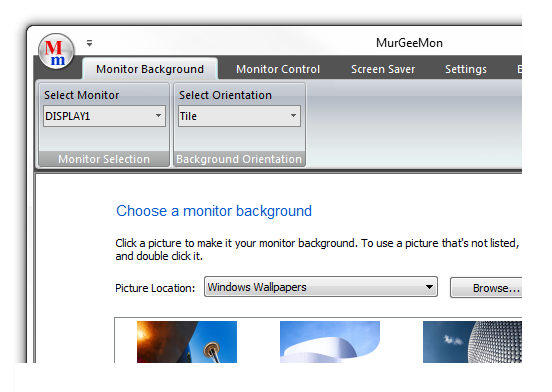
/ displays to your computer. Background selection for a
selected Monitor is as easy as in Windows Vista or
Windows 7. The Software Utility can be utilised to
change desktop background of upto 2 monitors / displays
connected to a given computer only. Change Primary
Monitor to external monitor easily from the system tray
menu. Enable Secondary Monitor from right click menu of
the system tray icon. Skinnable system tray menu to
access features of MurGeeMon dual monitor software.
Future versions will support more features and multiple
monitors. Download the MurgeeMon Software Utility today
and apply monitor background of your choice to your
indivual monitors.
Change Monitor or Desktop Background. Control Power
State of Secondary Monitor or all Monitors / Displays
connected to a Computer. Change Display Properties
easily and quickly. Download and try the MurgeeMon
Software Utility for free. Registered Users do not have
to pay again for the application updates. Utilize the
power of having dual monitors connected to your
computer today. The Company Website provides all the
relavent information about setting up multiple monitors
/ displays to your computer. Background selection for a
selected Monitor is as easy as in Windows Vista or
Windows 7. The Software Utility can be utilised to
change desktop background of upto 2 monitors / displays
connected to a given computer only. Change Primary
Monitor to external monitor easily from the system tray
menu. Enable Secondary Monitor from right click menu of
the system tray icon. Skinnable system tray menu to
access features of MurGeeMon dual monitor software.
Future versions will support more features and multiple
monitors. Download the MurgeeMon Software Utility today
and apply monitor background of your choice to your
indivual monitors.
Program details
Publisher
Vijay PE-mail
Contact the publisherHome page
http://www.murgee.com/MurGeeMon/Platforms
Windows 2000<br>Windows XPFile size
4817 KBFile date
7/8/2009License
SharewareExpiration info
20 UsesInstallation
Install & UninstallRecord updated
7/18/2009


