
Enhanced SharePoint User Tasks Menu
Version 1.0
Shareware
$490.00
0 downloads
How to assign SharePoint task item properties, like
completion, due date etc. with 1 click directly in
menu - like in Outlook?
Collaboration is one of the most common scenarios in
SharePoint portals. This frequently includes tasks
management operations. In comparison to Microsoft
Outlook, out-of-the-box, however, there are some
features missed. So the due date, task completion or
other settings can be done with several complicated
steps only. The Enhanced SharePoint User Tasks Menu
feature by Layer2 adds this often required features
directly to the SharePoint tasks menu.
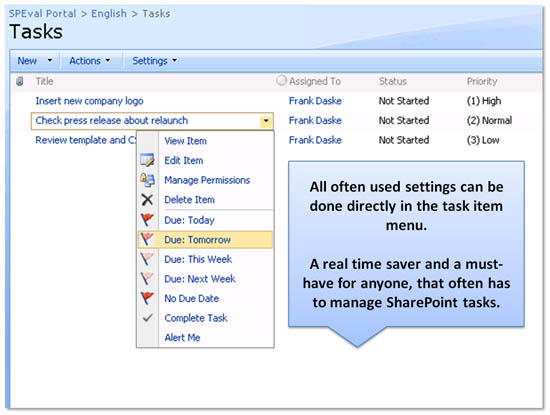
The Enhanced SharePoint User Tasks Menu feature
enables users to assign the due date, completion and
other properties of a tasks item directly with one
click using the items menu:
# If marked as completed the progress / completeness
is set to 100% automatically
# The due date of the task can be set to different
time frames directly in menu
# Due Date: Today - The due date is set to the
current day
# Due Date: Tomorrow - The due date is set to the
current day plus one day.
# Due Date: This Week - The due date is set to the
next friday of the current week. If it's saturday or
sunday the current date is used.
# Due Date: Next Week - The due date is set to the
friday of the next week.
# Due Date: No Due Date - The due date is removed.
It's a real time saver and a must-have for everyone,
that often has to manage SharePoint tasks.
The feature comes with a robust installer to allow it
to be easily deployed within any SharePoint
environment.
It is available for SharePoint starting with WSS 3.0
and MOSS 2007.
completion, due date etc. with 1 click directly in
menu - like in Outlook?
Collaboration is one of the most common scenarios in
SharePoint portals. This frequently includes tasks
management operations. In comparison to Microsoft
Outlook, out-of-the-box, however, there are some
features missed. So the due date, task completion or
other settings can be done with several complicated
steps only. The Enhanced SharePoint User Tasks Menu
feature by Layer2 adds this often required features
directly to the SharePoint tasks menu.
The Enhanced SharePoint User Tasks Menu feature
enables users to assign the due date, completion and
other properties of a tasks item directly with one
click using the items menu:
# If marked as completed the progress / completeness
is set to 100% automatically
# The due date of the task can be set to different
time frames directly in menu
# Due Date: Today - The due date is set to the
current day
# Due Date: Tomorrow - The due date is set to the
current day plus one day.
# Due Date: This Week - The due date is set to the
next friday of the current week. If it's saturday or
sunday the current date is used.
# Due Date: Next Week - The due date is set to the
friday of the next week.
# Due Date: No Due Date - The due date is removed.
It's a real time saver and a must-have for everyone,
that often has to manage SharePoint tasks.
The feature comes with a robust installer to allow it
to be easily deployed within any SharePoint
environment.
It is available for SharePoint starting with WSS 3.0
and MOSS 2007.
Program details
Publisher
Frank DaskeE-mail
Contact the publisherPlatforms
Windows XPFile size
97 KBFile date
7/14/2009License
SharewareExpiration info
Either/OrInstallation
Install & UninstallRecord updated
7/29/2009


