
MaxScheduler
Version 4.0
Shareware
$145.00
1 downloads
Scheduling software that lets you step-up from using
manual tools like spreadsheets, wallboards or piles of
paper. Well suited for manufacturing and warehousing.
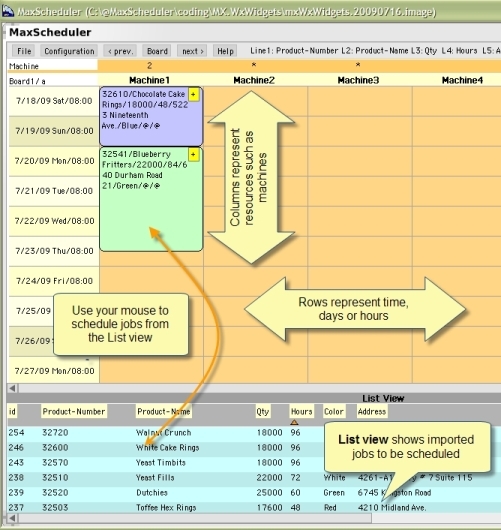
MaxScheduler is a desktop program that lets you import
jobs, create a graphical schedule from those jobs and
share it within your business as a set of webpages.
Editing the schedule is quickly done by using your
mouse, to move jobs around.
MaxScheduler makes it easier to manage the scheduling
of many jobs across multiple resources. You get the
benefits of having scheduling software without having
to dramatically change your current scheduling
process. You can import data from other computer
systems like: accounting, job-shop, WMS, MRP and ERP.
MaxScheduler has been used by our customers in a
variety of ways: Machine Scheduler, Receiving Door
Scheduler, Shipping Door Scheduler, Delivery
Scheduler, Scheduler for Quickbooks and Spreadsheet
manual tools like spreadsheets, wallboards or piles of
paper. Well suited for manufacturing and warehousing.
MaxScheduler is a desktop program that lets you import
jobs, create a graphical schedule from those jobs and
share it within your business as a set of webpages.
Editing the schedule is quickly done by using your
mouse, to move jobs around.
MaxScheduler makes it easier to manage the scheduling
of many jobs across multiple resources. You get the
benefits of having scheduling software without having
to dramatically change your current scheduling
process. You can import data from other computer
systems like: accounting, job-shop, WMS, MRP and ERP.
MaxScheduler has been used by our customers in a
variety of ways: Machine Scheduler, Receiving Door
Scheduler, Shipping Door Scheduler, Delivery
Scheduler, Scheduler for Quickbooks and Spreadsheet
Program details
Publisher
Peter GadzinskiE-mail
Contact the publisherHome page
http://maxscheduler.com/Platforms
Windows 95<br>Windows 98<br>Windows ME<br>Windows File size
28261 KBFile date
7/30/2009License
SharewareInstallation
Install & UninstallRecord updated
8/13/2009


