
Scan & Attach for Outlook™
Version 1.1
Shareware
$64.00
0 downloads
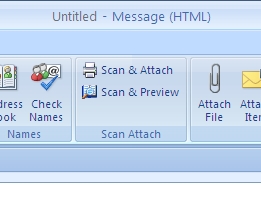
Scan & Attach saves you time whenever you want to scan
a document and send it as Outlook™ email attachment. It
adds a "Scan & Attach" button to new Outlook™ emails
and replies. When that button is clicked the scanner
begins the scanning process. The scanned image will
then directly be attached to the Outlook™ email as a
PDF, TIFF, JPEG, PNG or BMP file. When required the
"Scan & Preview" button opens a full blown image editor.
All the options you may possibly need to adjust, crop,
flip or reorder the scanned images
before attaching them to the Outlook email are there.
The editor supports multiple languages and 18 different
skins to offer you the interface that you prefer best.
a document and send it as Outlook™ email attachment. It
adds a "Scan & Attach" button to new Outlook™ emails
and replies. When that button is clicked the scanner
begins the scanning process. The scanned image will
then directly be attached to the Outlook™ email as a
PDF, TIFF, JPEG, PNG or BMP file. When required the
"Scan & Preview" button opens a full blown image editor.
All the options you may possibly need to adjust, crop,
flip or reorder the scanned images
before attaching them to the Outlook email are there.
The editor supports multiple languages and 18 different
skins to offer you the interface that you prefer best.
Program details
Publisher
Opusflow opusflowE-mail
Contact the publisherPlatforms
Windows 2000<br>Windows XPFile size
3024 KBFile date
8/11/2009License
SharewareExpires after
30 daysInstallation
Install & UninstallRecord updated
8/25/2009