
Headset Button
Version 1.01
Shareware
$12.85
0 downloads
Switch tracks and FM channels via wired headset button.
Headset Button application enables you to use wired
headset button not only to answer phone calls. With
Headset Button you can can switch tracks and FM
channels, pause and resume playback, mute and unmute
the sound while your device peacefully rests in its
case or in your pocket. Just, press the wired headset
button. And Headset Button does it for you!
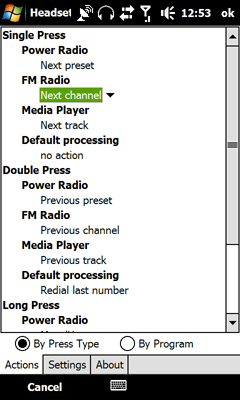
Three different kinds of presses are recognized:
single, double and continuous (press&hold). Three
different presses - hence, three different commands.
Three different actions could be performed by media
player or FM tuner when they are on.
And, if phone call comes in, the wired headset button
works as usual (as arranged by the manufacturer),
giving you control over the phone.
Headset Button application enables you to use wired
headset button not only to answer phone calls. With
Headset Button you can can switch tracks and FM
channels, pause and resume playback, mute and unmute
the sound while your device peacefully rests in its
case or in your pocket. Just, press the wired headset
button. And Headset Button does it for you!
Three different kinds of presses are recognized:
single, double and continuous (press&hold). Three
different presses - hence, three different commands.
Three different actions could be performed by media
player or FM tuner when they are on.
And, if phone call comes in, the wired headset button
works as usual (as arranged by the manufacturer),
giving you control over the phone.
Program details
Publisher
Igor LozovskyE-mail
Contact the publisherHome page
http://headsetbutton.com/Platforms
Windows CE 1.0<br>Windows CE 2.0File size
335 KBFile date
9/30/2009License
SharewareInstallation
Install & UninstallRecord updated
10/2/2009


