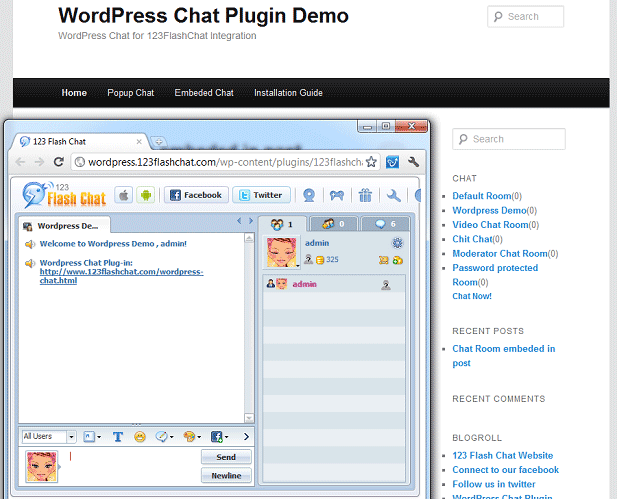

WordPress Chat for 123 Flash Chat
Version 1.0
Freeware
Free
0 downloads
123 Flash Chat WordPress Plugin can be used to create
your own chat room in WordPress. It allows you to
insert chat room to your sidebar, with either a lite
chat client or a link to standard chat client in popup
mod. And you can define the width and height of 123
Flash Chat as well as its skin & language.
After activate the plug-in, you can set flash chat
configuration in admin panel: Setting: Flash Chat. You
may easily get a free chat room hosting service via
choosing “hosted by 123flashchat.com free of charge
and naming your own room simply in admin panel. If you
are 123FlashChat's license buyer or hosting service
buyer, you may get more professional technique support
for free.
Have a try with Live Demo for WordPress Chat Plugin!
http://blog.topcmm.com/
More details about WordPress Chat for 123 Flash Chat:
It provides 3 solutions for webmasters to add a live
chat room into WordPress website:
1)Free 123 Flash Chat Hosting Service
Advantages: It’s hosted by 123 Flash Chat free of
charge, no limitation to the number of concurrent user,
and provide basic chat function and flash game port.&
options of chat skin.
Limitation: Some management functions are unavailable.
Gain Free Chat Room Script Code:
http://www.123flashchat.com/free-flash-chat.html
2)Free version of 123 Flash Chat software
Advantages: full functions. All cool optional modules
of 123 Flash Chat are available, including webcam chat
& customizable Logo. ( The only limit is 10 concurrent
users will be allowed.)
Free Download Link:
http://www.123flashchat.com/download.html
3)Charged version of 123FlashChat hosting service /
server software
Advantages: Full 7*24 hours support service,
multi-client choice, No commercials, and meet your more
need for integration. Start at $19.
For more details: http://www.123flashchat.com/feature.html
your own chat room in WordPress. It allows you to
insert chat room to your sidebar, with either a lite
chat client or a link to standard chat client in popup
mod. And you can define the width and height of 123
Flash Chat as well as its skin & language.
After activate the plug-in, you can set flash chat
configuration in admin panel: Setting: Flash Chat. You
may easily get a free chat room hosting service via
choosing “hosted by 123flashchat.com free of charge
and naming your own room simply in admin panel. If you
are 123FlashChat's license buyer or hosting service
buyer, you may get more professional technique support
for free.
Have a try with Live Demo for WordPress Chat Plugin!
http://blog.topcmm.com/
More details about WordPress Chat for 123 Flash Chat:
It provides 3 solutions for webmasters to add a live
chat room into WordPress website:
1)Free 123 Flash Chat Hosting Service
Advantages: It’s hosted by 123 Flash Chat free of
charge, no limitation to the number of concurrent user,
and provide basic chat function and flash game port.&
options of chat skin.
Limitation: Some management functions are unavailable.
Gain Free Chat Room Script Code:
http://www.123flashchat.com/free-flash-chat.html
2)Free version of 123 Flash Chat software
Advantages: full functions. All cool optional modules
of 123 Flash Chat are available, including webcam chat
& customizable Logo. ( The only limit is 10 concurrent
users will be allowed.)
Free Download Link:
http://www.123flashchat.com/download.html
3)Charged version of 123FlashChat hosting service /
server software
Advantages: Full 7*24 hours support service,
multi-client choice, No commercials, and meet your more
need for integration. Start at $19.
For more details: http://www.123flashchat.com/feature.html
Program details
Publisher
Daniel JiangE-mail
Contact the publisherHome page
http://www.123flashchat.com/Platforms
Windows 95<br>Windows 98<br>Windows ME<br>Windows File size
12 KBFile date
11/25/2009License
FreewareInstallation
Install & UninstallRecord updated
12/1/2009