
Luxand Wave FX
Version 1.0
Freeware
Free
0 downloads
Shoot realistic underwater video clips with free wave plugin for Adobe After Effects! Wave FX adds realistic wave effect to videos in just a couple of clicks. Simulate different liquids with various opacity, viscosity, surface tension and inertia. Seven configuration settings offer endless opportunities to create just the waves you need!
Wave FX makes adding realistic waves to your video a matter of just a few mouse clicks. Just launch Adobe After Effects, load your video, and process it with the Wave FX plugin to make a stunning underwater video clip!
With Wave FX, you can make your video clips appear to be shot underwater, or recorded with a camera immersed into other liquids with a variety of settings. For example, choosing a higher viscosity and more inertia for your waves will simulate oil immersion, which will look even more realistic when you adjust the transparency setting. Normal viscosity will produce waves on the water, and lower viscosity and inertia settings will simulate the appearance of waves on lighter liquids such as spirit or gasoline.
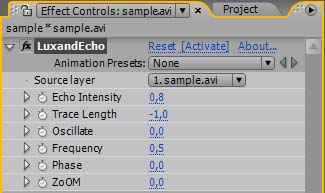
There are seven parameters to configure, including Path, Frequency, Disturbance, Surface Tension, Inertia, Viscosity, and Transparency. Higher tension, inertia and viscosity will correspond to denser liquids such as oil, while lower settings will create waves on a lighter liquid such as water, gasoline, or spirit.
The free Luxand Wave FX plugin will not cost you a dime. Download it now and give it a go!
Wave FX makes adding realistic waves to your video a matter of just a few mouse clicks. Just launch Adobe After Effects, load your video, and process it with the Wave FX plugin to make a stunning underwater video clip!
With Wave FX, you can make your video clips appear to be shot underwater, or recorded with a camera immersed into other liquids with a variety of settings. For example, choosing a higher viscosity and more inertia for your waves will simulate oil immersion, which will look even more realistic when you adjust the transparency setting. Normal viscosity will produce waves on the water, and lower viscosity and inertia settings will simulate the appearance of waves on lighter liquids such as spirit or gasoline.
There are seven parameters to configure, including Path, Frequency, Disturbance, Surface Tension, Inertia, Viscosity, and Transparency. Higher tension, inertia and viscosity will correspond to denser liquids such as oil, while lower settings will create waves on a lighter liquid such as water, gasoline, or spirit.
The free Luxand Wave FX plugin will not cost you a dime. Download it now and give it a go!
Program details
Publisher
Luxand ContactE-mail
Contact the publisherHome page
http://luxand.com/fx/wave/Platforms
Windows 95<br>Windows 98<br>Windows ME<br>Windows File size
907 KBFile date
2/16/2010License
FreewareInstallation
Install & UninstallRecord updated
3/2/2010


