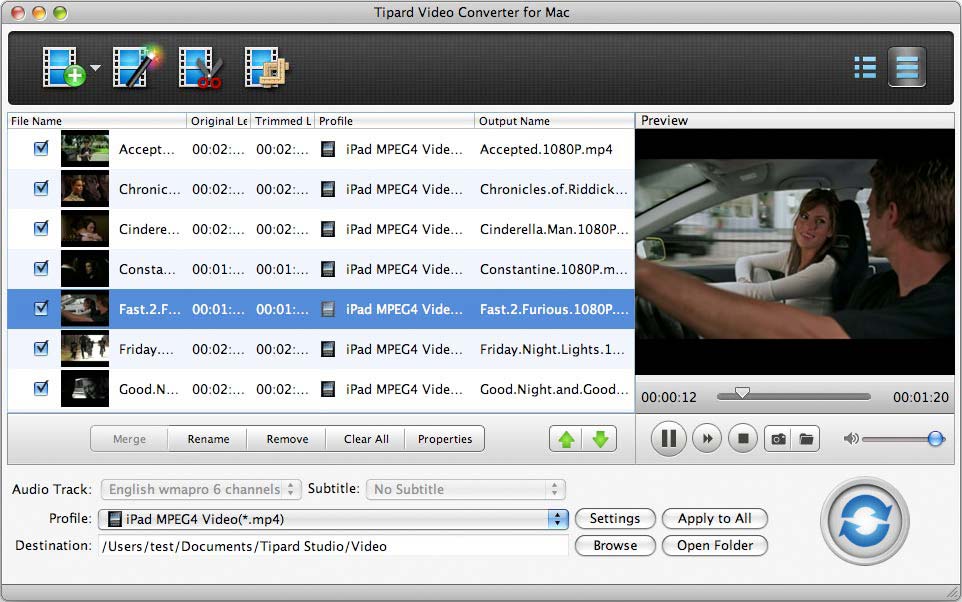

Tipard Video Converter for Mac
Version 4.2.36
Shareware
$42.00
0 downloads
Tipard Video Converter for Mac is a popular video
converter for Mac users. It can convert any video and
audio format, for example: it can convert AVI, MP4,
MPG, MOD, TOD, MOV, MKV, WMV, DivX, XviD, MPEG-1/2,
3GP, 3G2, VOB, MPV, FLV, and HD videos. And it can
extract audio from video file and convert it to any
popular audio format, like M4A, MP3, AC3, AAC, etc.
After updated, it supports iPhone 5, iPod Touch 5, iPad
mini, iPad 4, iPod Nano 7, Microsoft Surface and
Samsung Galaxy Note.
Key functions:
1.Convert popular video files and HD Video for Mac
Tipard Video Converter for Mac can convert all video
formats to the format you want at the fast speed and
with the best output quality.
2.Extract audio and convert it
You can easily extract audio from video file and
convert it to any popular audio format with this Mac
video converter, like M4A, MP3, AC3, AAC, WMA, WAV,
OGG, AU, Nut, AIFF, FLAC, AMR, etc.
3.Adjust video effect
With this Tipard Video Converter for Mac, you can
adjust the video Brightness, Contrast, Saturation to
better your videos with special effects.
4.Watermark your video
It lets you watermark your video by adding Text or
Picture watermark to your own preference.
5.Trim, Crop, Merge
Use "Trim" in this video Converter for Mac to get any
segment of your videos, then output to your players;
Using "Crop" to get your devices best suited play
region; Using "Merge" to obtain one successive videos
for your enjoyment.
6.Preview
The bulit-in player allows you to preview the output
video before converting. And you can get a fully
control of the video effect.
converter for Mac users. It can convert any video and
audio format, for example: it can convert AVI, MP4,
MPG, MOD, TOD, MOV, MKV, WMV, DivX, XviD, MPEG-1/2,
3GP, 3G2, VOB, MPV, FLV, and HD videos. And it can
extract audio from video file and convert it to any
popular audio format, like M4A, MP3, AC3, AAC, etc.
After updated, it supports iPhone 5, iPod Touch 5, iPad
mini, iPad 4, iPod Nano 7, Microsoft Surface and
Samsung Galaxy Note.
Key functions:
1.Convert popular video files and HD Video for Mac
Tipard Video Converter for Mac can convert all video
formats to the format you want at the fast speed and
with the best output quality.
2.Extract audio and convert it
You can easily extract audio from video file and
convert it to any popular audio format with this Mac
video converter, like M4A, MP3, AC3, AAC, WMA, WAV,
OGG, AU, Nut, AIFF, FLAC, AMR, etc.
3.Adjust video effect
With this Tipard Video Converter for Mac, you can
adjust the video Brightness, Contrast, Saturation to
better your videos with special effects.
4.Watermark your video
It lets you watermark your video by adding Text or
Picture watermark to your own preference.
5.Trim, Crop, Merge
Use "Trim" in this video Converter for Mac to get any
segment of your videos, then output to your players;
Using "Crop" to get your devices best suited play
region; Using "Merge" to obtain one successive videos
for your enjoyment.
6.Preview
The bulit-in player allows you to preview the output
video before converting. And you can get a fully
control of the video effect.
Program details
Publisher
Tipard StudioE-mail
Contact the publisherPlatforms
Macintosh 68kFile size
23552 KBFile date
2/25/2013License
SharewareExpires on
5/31/2013Expires after
99 daysExpiration info
Trial version can convert files for 5 minutes.Installation
Install & UninstallRecord updated
2/26/2013

