
PST Merge Tool
Version 2.4
Shareware
$69.00
0 downloads
Now you are able to merge the entire items of PST files
in to a single PST files using our PST Merge tool.
There is great problem for users who have Unlimited
collection of small size PST files and then it would be
difficult for them to search specific information of a
particular PST file that was in a separate folder
before. To solve this difficulty, you can decide to
merge the folder that can come in a particular group.
PST Merge Software successfully merge all entire items
of PST files like journals, calendar, to-do list,
contacts and email to a single file. Our software does
not require any expertise & technical for merging PST
files. Some steps are used to merge separate PST
database to single file:-
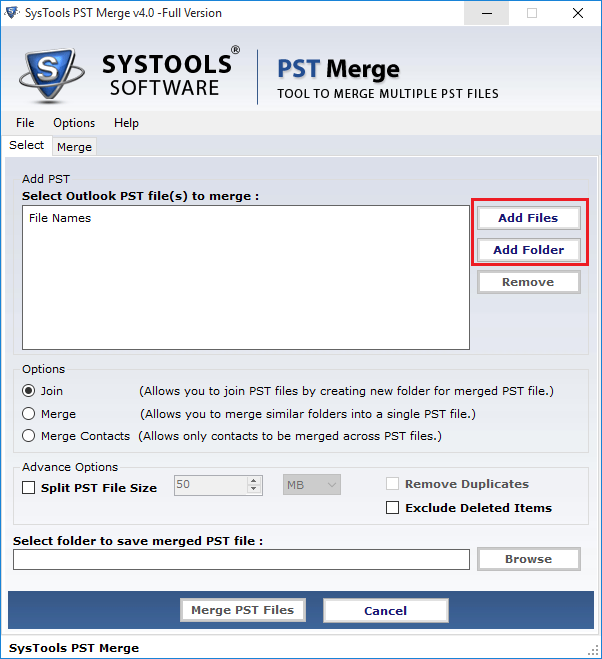
1- Try to open SysTools PST Merge software to merge
multiple separate PST files to a single file.
2- Collect entirely PST items from different location
and browse them,
3- Click on "Add"
4- After this process you can find merged data (single
file instead of multiple files).
5- Select the appropriate location where you want to
save merged data.
PST Merge Tool smoothly run on Outlook version 97, 98,
2000, 2003, 2007 & 2010 and Windows version Windows 7,
Vista, XP, 2003, 2002 & 98. If you try to use above
steps carefully, then you can successfully merge
multiple PST files to a single PST file without
altering any original database. You can download the
demo version of PST Merge Tool to evaluate the working
of merging process of PST files. It can merge only
first 5 PST items without saving option. For saving
merged PST files in a single PST file you can order the
full licensed version of software for personal license
at $69 & for business license at $199.
in to a single PST files using our PST Merge tool.
There is great problem for users who have Unlimited
collection of small size PST files and then it would be
difficult for them to search specific information of a
particular PST file that was in a separate folder
before. To solve this difficulty, you can decide to
merge the folder that can come in a particular group.
PST Merge Software successfully merge all entire items
of PST files like journals, calendar, to-do list,
contacts and email to a single file. Our software does
not require any expertise & technical for merging PST
files. Some steps are used to merge separate PST
database to single file:-
1- Try to open SysTools PST Merge software to merge
multiple separate PST files to a single file.
2- Collect entirely PST items from different location
and browse them,
3- Click on "Add"
4- After this process you can find merged data (single
file instead of multiple files).
5- Select the appropriate location where you want to
save merged data.
PST Merge Tool smoothly run on Outlook version 97, 98,
2000, 2003, 2007 & 2010 and Windows version Windows 7,
Vista, XP, 2003, 2002 & 98. If you try to use above
steps carefully, then you can successfully merge
multiple PST files to a single PST file without
altering any original database. You can download the
demo version of PST Merge Tool to evaluate the working
of merging process of PST files. It can merge only
first 5 PST items without saving option. For saving
merged PST files in a single PST file you can order the
full licensed version of software for personal license
at $69 & for business license at $199.
Program details
Publisher
PST Merge ToolE-mail
Contact the publisherPlatforms
Windows 2000<br>Windows XPFile size
2950 KBFile date
6/3/2010License
SharewareExpiration info
Record updated
6/4/2010


