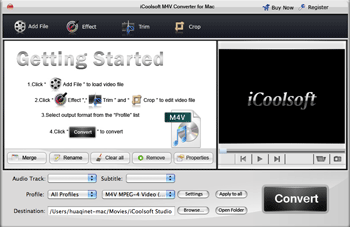

iCoolsoft M4V Converter for Mac
Version 3.1.06
Shareware
$34.50
0 downloads
iCoolsoft M4V Converter for Mac enables you to create
M4V videos from various video files, it can convert
AVI to M4V, WMV to M4V, FLV to M4V, MPEG to M4V, and
so on. It also helps you convert M4V videos to popular
video formats.
M4V files are iTunes Video Files, compatible with
iPod, iPhone, Apple TV and other Apple devices. If you
want to convert videos to iPod, you can use iCoolsoft
M4V Converter for Mac to convert these video files to
M4V videos. This tool also enables you to convert M4V
videos to other video formats like MP4, WMV, H.264,
etc. for watching on other portable players or other
uses.
Features:
Convert videos to M4V on Mac
You can convert most HD videos and general videos to
M4V files, including TS, MTS, M2TS, HD MPEG, HD MP4,
HD WMV, AVI, MPEG, RMVB, MOV, WMV, ASF, 3GP, FLV, MKV,
and so on.
Convert M4V to popular videos
This tool also helps you load M4V videos and output
popular video/audio formats. You can use it to convert
video to video, video to audio and audio to audio.
Adjust video quality
Beginners can use the ready profiles to easily output
videos of any format. Pro users have the option of
tweaking all encoding settings like Video Encoder,
Resolution, Frame Rate, Video Bitrate, Audio Encoder,
Sample Rate, Channels, Audio Encoder, etc.
Set video effect
You are allowed to adjust video Brightness, Contrast,
and Saturation to optimize the output effect. You can
easily apply the adjustment to all videos using
the "Apply to All" function.
Edit videos
Handy features
You can preview all source videos and compare original
video with output video before converting. You are
allowed to set different output formats for each
video, choose from the source audio tracks and
subtitles. There are more practical features for your
to explore.
M4V videos from various video files, it can convert
AVI to M4V, WMV to M4V, FLV to M4V, MPEG to M4V, and
so on. It also helps you convert M4V videos to popular
video formats.
M4V files are iTunes Video Files, compatible with
iPod, iPhone, Apple TV and other Apple devices. If you
want to convert videos to iPod, you can use iCoolsoft
M4V Converter for Mac to convert these video files to
M4V videos. This tool also enables you to convert M4V
videos to other video formats like MP4, WMV, H.264,
etc. for watching on other portable players or other
uses.
Features:
Convert videos to M4V on Mac
You can convert most HD videos and general videos to
M4V files, including TS, MTS, M2TS, HD MPEG, HD MP4,
HD WMV, AVI, MPEG, RMVB, MOV, WMV, ASF, 3GP, FLV, MKV,
and so on.
Convert M4V to popular videos
This tool also helps you load M4V videos and output
popular video/audio formats. You can use it to convert
video to video, video to audio and audio to audio.
Adjust video quality
Beginners can use the ready profiles to easily output
videos of any format. Pro users have the option of
tweaking all encoding settings like Video Encoder,
Resolution, Frame Rate, Video Bitrate, Audio Encoder,
Sample Rate, Channels, Audio Encoder, etc.
Set video effect
You are allowed to adjust video Brightness, Contrast,
and Saturation to optimize the output effect. You can
easily apply the adjustment to all videos using
the "Apply to All" function.
Edit videos
Handy features
You can preview all source videos and compare original
video with output video before converting. You are
allowed to set different output formats for each
video, choose from the source audio tracks and
subtitles. There are more practical features for your
to explore.
Program details
Publisher
iCoolsoft StudioE-mail
Contact the publisherPlatforms
Macintosh PPCFile size
10225 KBFile date
3/19/2010License
SharewareInstallation
Install & UninstallRecord updated
6/7/2010
