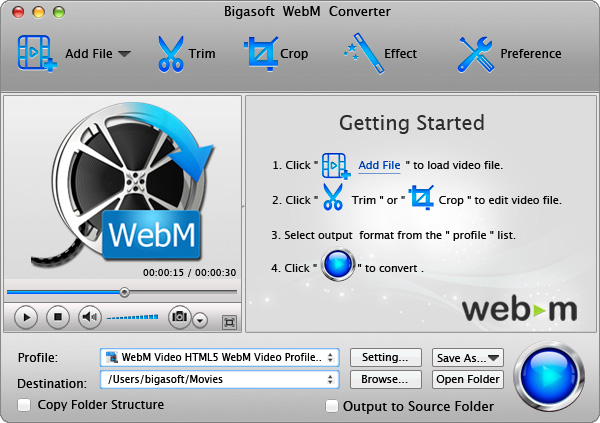

Bigasoft WebM Converter for Mac
Version 2.1.8.3879
Shareware
$39.99
1 downloads
Bigasoft WebM Converter for Mac is a powerful WebM/VP8
encoder as well as a professional VP8/WebM decoder. It
can create and convert any video format including MP4,
MOV, AVI, 3GP, FLV, H.264, MKV, WMV, RM, RMVB, VOB,
Xvid, DivX, HD, and more to HTML5 supported WebM/VP8
format on Mac OS X. It can also convert WebM/VP8 to
any other video format. Besides it can extract audio
from WebM file and any other videos and save as OGG,
MP3, AAC, AC3, etc.
In the same time, Bigasoft WebM Converter for Mac can
decode and convert WebM/VP8 to any other video format
including MPEG-4, H.264, Xvid, DivX, DV, HDV, HD,
AVCH, MTS, TS, MP3, OGG, AAC and MP2 etc. And it even
can extract audio from WebM/VP8 and then save as OGG,
MP3, AAC, AC3, WAV, WMA, and more.
Key features
1. Support creating WebM file from over 150 formats;
2. Support converting WebM to over 150 formats;
3. Enjoy VP8 video on many portable devices including
iPod, iPhone, iPad, PSP, Zune, MP4 players, etc.;
4. Trim at will
You are able to trim only your wanted segment with
this software;
5. Remove black bars
You can easily remove black bars and focus video by
the video to WebM converter Mac;
6. Merge videos
VP8 converter Mac can merge different source videos as
an integrated video file;
7. Support batch conversion
Check as many chapters as you like and the ideal Mac
WebM encoder will automatically convert them one by
one;
8. Take pictures
You can take images from favorite movie by "Snapshot"
feature;
9. Support multiple languages
Many languages are available like English, German,
French, Spanish, Japanese, Arabic, Italian and Chinese;
10. Compatible with Mac
It is compatible with Mac OS X 10.4(Tiger), 10.5
(Leopard), and 10.6(Snow Leopard).
encoder as well as a professional VP8/WebM decoder. It
can create and convert any video format including MP4,
MOV, AVI, 3GP, FLV, H.264, MKV, WMV, RM, RMVB, VOB,
Xvid, DivX, HD, and more to HTML5 supported WebM/VP8
format on Mac OS X. It can also convert WebM/VP8 to
any other video format. Besides it can extract audio
from WebM file and any other videos and save as OGG,
MP3, AAC, AC3, etc.
In the same time, Bigasoft WebM Converter for Mac can
decode and convert WebM/VP8 to any other video format
including MPEG-4, H.264, Xvid, DivX, DV, HDV, HD,
AVCH, MTS, TS, MP3, OGG, AAC and MP2 etc. And it even
can extract audio from WebM/VP8 and then save as OGG,
MP3, AAC, AC3, WAV, WMA, and more.
Key features
1. Support creating WebM file from over 150 formats;
2. Support converting WebM to over 150 formats;
3. Enjoy VP8 video on many portable devices including
iPod, iPhone, iPad, PSP, Zune, MP4 players, etc.;
4. Trim at will
You are able to trim only your wanted segment with
this software;
5. Remove black bars
You can easily remove black bars and focus video by
the video to WebM converter Mac;
6. Merge videos
VP8 converter Mac can merge different source videos as
an integrated video file;
7. Support batch conversion
Check as many chapters as you like and the ideal Mac
WebM encoder will automatically convert them one by
one;
8. Take pictures
You can take images from favorite movie by "Snapshot"
feature;
9. Support multiple languages
Many languages are available like English, German,
French, Spanish, Japanese, Arabic, Italian and Chinese;
10. Compatible with Mac
It is compatible with Mac OS X 10.4(Tiger), 10.5
(Leopard), and 10.6(Snow Leopard).
Program details
Publisher
Bigasoft CorporationE-mail
Contact the publisherPlatforms
Macintosh 68k<br>Macintosh PPCFile size
21077 KBFile date
8/15/2010License
SharewareExpiration info
Uses - The maximum 5 minutes conversionInstallation
Install & UninstallRecord updated
8/22/2010
