
Import vCards to Outlook
Version 2.0
Shareware
$49.00
0 downloads
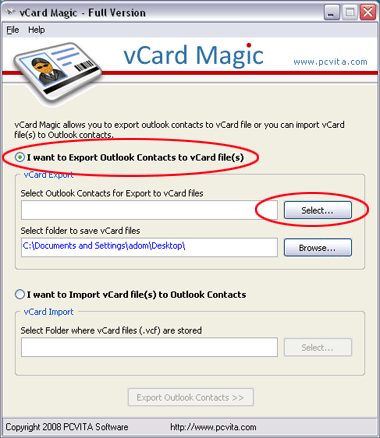
Import vCard to Outlook for mass emailing using our
vCard import tool. Some time you may have multiple
contact lists in VCF file format and you can import
single vCard to Outlook at a time manually that is very
hard work and time wasting work. Get PCVITA vCard Magic
software to import multiple vCards into Outlook at a
time. This vCard import tool is an easy-to-use VCF to
PST converter that can import vCards in Outlook with
all contact details. VCF import to Outlook software can
export and import multiple entries vCard files as well
as files containing only one entry. Our vCard import
tool also import vCard files using build-in Microsoft
Outlook engine and manage duplicates when importing
duplicated contacts. vCard import tool can export and
import multiple vCards into Outlook at a time. By
default Outlook imports only single .vcf file to
Outlook or only imports first contact from multiple
vCards file but using our vCard Magic users can import
unlimited vCard (.vcf) files in Outlook at a time.
Import vCards to Outlook Software from PCVITA
efficiently converts MS Outlook contacts .pst files to
vCard .vcf files. Import vCards to Outlook Software is
a perfect solution to import VCF to Outlook. Import
vCards to Outlook performs user friendly conversion
process that lets you do the critical work in minutes.
Using our software, you can import vCards to Outlook in
following versions: * Import vCards to Outlook 2010 *
Import vCards to Outlook 2007 * Import vCards to
Outlook 2003 * Import vCards to Outlook 2002 * Import
vCards to Outlook 2000. PCVITA offers best and
effective vCard to Outlook converter tool to import
vCards (.vcf) files in Microsoft Outlook contacts.
Outlook Contacts to vCard Converter software performs
easy & simple conversion of Outlook contacts to vCard
files. Software also allows you to create new Contact
folder in Outlook when importing .vcf files. All in all
a perfect Outlook Contacts management tool at
affordable price $49 only.
vCard import tool. Some time you may have multiple
contact lists in VCF file format and you can import
single vCard to Outlook at a time manually that is very
hard work and time wasting work. Get PCVITA vCard Magic
software to import multiple vCards into Outlook at a
time. This vCard import tool is an easy-to-use VCF to
PST converter that can import vCards in Outlook with
all contact details. VCF import to Outlook software can
export and import multiple entries vCard files as well
as files containing only one entry. Our vCard import
tool also import vCard files using build-in Microsoft
Outlook engine and manage duplicates when importing
duplicated contacts. vCard import tool can export and
import multiple vCards into Outlook at a time. By
default Outlook imports only single .vcf file to
Outlook or only imports first contact from multiple
vCards file but using our vCard Magic users can import
unlimited vCard (.vcf) files in Outlook at a time.
Import vCards to Outlook Software from PCVITA
efficiently converts MS Outlook contacts .pst files to
vCard .vcf files. Import vCards to Outlook Software is
a perfect solution to import VCF to Outlook. Import
vCards to Outlook performs user friendly conversion
process that lets you do the critical work in minutes.
Using our software, you can import vCards to Outlook in
following versions: * Import vCards to Outlook 2010 *
Import vCards to Outlook 2007 * Import vCards to
Outlook 2003 * Import vCards to Outlook 2002 * Import
vCards to Outlook 2000. PCVITA offers best and
effective vCard to Outlook converter tool to import
vCards (.vcf) files in Microsoft Outlook contacts.
Outlook Contacts to vCard Converter software performs
easy & simple conversion of Outlook contacts to vCard
files. Software also allows you to create new Contact
folder in Outlook when importing .vcf files. All in all
a perfect Outlook Contacts management tool at
affordable price $49 only.
Program details
Publisher
Import vCards to OutlookE-mail
Contact the publisherPlatforms
Windows NT 3.xFile size
1679 KBFile date
1/10/2011License
SharewareExpiration info
Installation
Install & UninstallRecord updated
1/11/2011


