
Transfer Outlook Contacts to XLS
Version 4.0
Shareware
$49.00
0 downloads
SysTools has released a new version of vCard Export
4.0. The Migration Software runs in all versions of
Windows such as Windows 2000/XP/2003/Vista/Windows 7
and no more hardware required operating this software.
It is the easiest way to maintain Outlook Contacts to
Excel. Just Export Outlook Contacts in Excel Format for
further use. Because you can’t copy Outlook Contacts to
XLS file so you have to use any conversion tool for
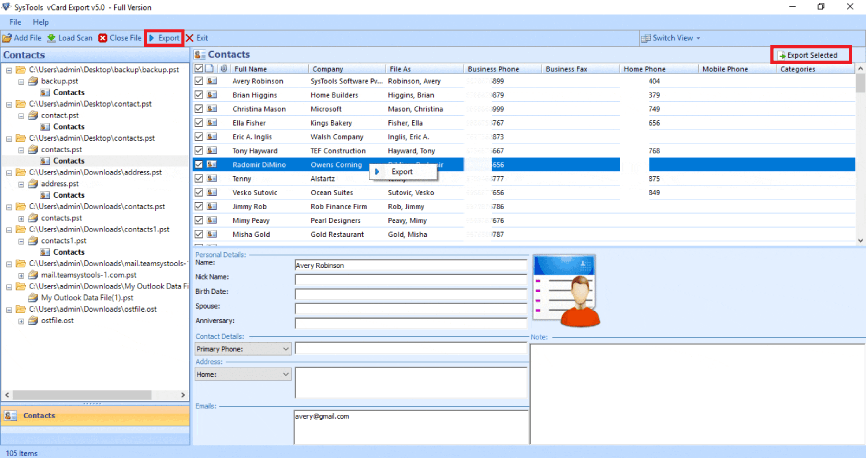
contacts conversion. Only 2 or 3 steps required to
transfer Outlook Contacts to XLS file such as
1. Browse Orphan or Configured PST file
2. Scan Outlook Contacts
3. Click on “Save” button to transfer Outlook Contacts
to XLS file
After conversion, you are free to use all option of MS
Excel into converted Outlook Contacts. It is the
easiest way to solve your problem of “How to move MS
Outlook Contacts”. You can use this software for any
PST file either it is configured or orphan PST file.
ANSI or Unicode, both file format are preferred by
SysTools vCard Export Tool. Convert Unlimited Outlook
Contacts to Excel at once. If you want to convert
limited Outlook Contacts, you may try demo version that
is sufficient to convert 15 contacts of Outlook at a
time. For using all features of this software, you have
to purchase licensed key. Licensed version is now
available with reasonable price at $49.
4.0. The Migration Software runs in all versions of
Windows such as Windows 2000/XP/2003/Vista/Windows 7
and no more hardware required operating this software.
It is the easiest way to maintain Outlook Contacts to
Excel. Just Export Outlook Contacts in Excel Format for
further use. Because you can’t copy Outlook Contacts to
XLS file so you have to use any conversion tool for
contacts conversion. Only 2 or 3 steps required to
transfer Outlook Contacts to XLS file such as
1. Browse Orphan or Configured PST file
2. Scan Outlook Contacts
3. Click on “Save” button to transfer Outlook Contacts
to XLS file
After conversion, you are free to use all option of MS
Excel into converted Outlook Contacts. It is the
easiest way to solve your problem of “How to move MS
Outlook Contacts”. You can use this software for any
PST file either it is configured or orphan PST file.
ANSI or Unicode, both file format are preferred by
SysTools vCard Export Tool. Convert Unlimited Outlook
Contacts to Excel at once. If you want to convert
limited Outlook Contacts, you may try demo version that
is sufficient to convert 15 contacts of Outlook at a
time. For using all features of this software, you have
to purchase licensed key. Licensed version is now
available with reasonable price at $49.
Program details
Publisher
Transfer Outlook Contacts to XLSE-mail
Contact the publisherPlatforms
Windows 95<br>Windows 98<br>Windows ME<br>Windows File size
3338 KBFile date
9/24/2010License
SharewareExpiration info
Installation
Install & UninstallRecord updated
9/24/2010


