
Lock and Unlock Your PC With USB Drive Software
Version 7.0
Shareware
$19.99
0 downloads
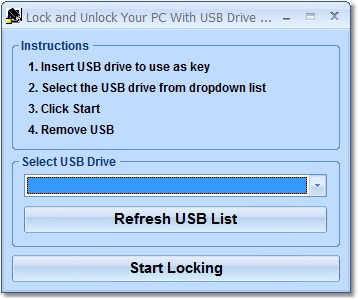
This software offers a solution to users who want to
lock their computer using a USB device as a physical
key instead of a password. Each USB device has a
unique identity and with this software it can be used
as a key. Simply insert a flash drive into the
computer then select that drive from the dropdown
list, click start and remove the USB device. The
computer is then locked until the same drive is
inserted again. This easy to use software provides
easy and sure security against others using your
computer while you are away.
lock their computer using a USB device as a physical
key instead of a password. Each USB device has a
unique identity and with this software it can be used
as a key. Simply insert a flash drive into the
computer then select that drive from the dropdown
list, click start and remove the USB device. The
computer is then locked until the same drive is
inserted again. This easy to use software provides
easy and sure security against others using your
computer while you are away.
Program details
Publisher
Peter SobolE-mail
Contact the publisherHome page
http://www.sobolsoft.com/lockpcusb/Platforms
Windows 98<br>Windows ME<br>Windows 2000<br>Windows XPFile size
5356 KBFile date
9/24/2010License
SharewareInstallation
Install & UninstallRecord updated
2/7/2014