
How to Merge Outlook Archive Folders
Version 2.4
Shareware
$69.00
0 downloads
Managing single file in palace of multiple PST files is
an easy task but persistent use of Outlook has numerous
collections of PST files in Outlook mailbox. Due to
this you are always thinking how to merge Outlook
archive folders and put them in one PST. We recommended
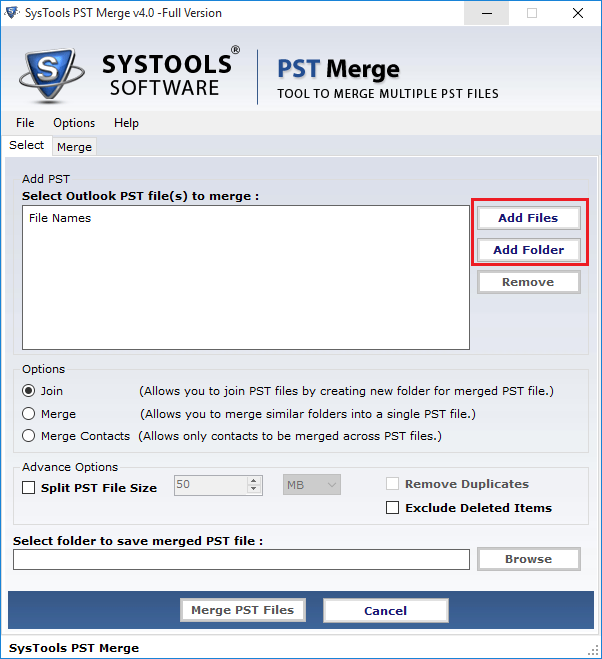
you to use SysTools PST Merge Software to merge
multiple Outlook PST files to one PST with ease. PST
Merger software merges MS Outlook journals, calendar,
to-do list, contact, and email attachment etc to one
PST. Merge PST files software is very reliable and
gives you very high performance PST merging just in few
minutes. PST Merge software is able to provide 100%
safe result because of its very sophisticated and
advanced features which are summarized under -
* It is able to merge UNLIMITED MS Outlook PST files
with one PST.
* Fast, effective and accurate merging of data without
any loss of important information.
* Supports all versions of MS Outlook i.e. 97, 98,
2000, 2003, 2007 & 2010.
* Supports Windows operating systems like 98, 2000,
2003, XP, Vista & Win 7.
* Any kind of technical skills are not requiring from
you sides.
Further more information you can download online demo
version to merge five PST files to one PST. This demo
version is absolutely free. If you think that PST Merge
Software will help you to merge multiple PST files to
one PST then you can purchase full version $69 only.
an easy task but persistent use of Outlook has numerous
collections of PST files in Outlook mailbox. Due to
this you are always thinking how to merge Outlook
archive folders and put them in one PST. We recommended
you to use SysTools PST Merge Software to merge
multiple Outlook PST files to one PST with ease. PST
Merger software merges MS Outlook journals, calendar,
to-do list, contact, and email attachment etc to one
PST. Merge PST files software is very reliable and
gives you very high performance PST merging just in few
minutes. PST Merge software is able to provide 100%
safe result because of its very sophisticated and
advanced features which are summarized under -
* It is able to merge UNLIMITED MS Outlook PST files
with one PST.
* Fast, effective and accurate merging of data without
any loss of important information.
* Supports all versions of MS Outlook i.e. 97, 98,
2000, 2003, 2007 & 2010.
* Supports Windows operating systems like 98, 2000,
2003, XP, Vista & Win 7.
* Any kind of technical skills are not requiring from
you sides.
Further more information you can download online demo
version to merge five PST files to one PST. This demo
version is absolutely free. If you think that PST Merge
Software will help you to merge multiple PST files to
one PST then you can purchase full version $69 only.
Program details
Publisher
How to Merge Outlook Archive FoldersE-mail
Contact the publisherPlatforms
Windows 2000<br>Windows XPFile size
2560 KBFile date
10/19/2010License
SharewareExpiration info
Installation
Install & UninstallRecord updated
10/19/2010


