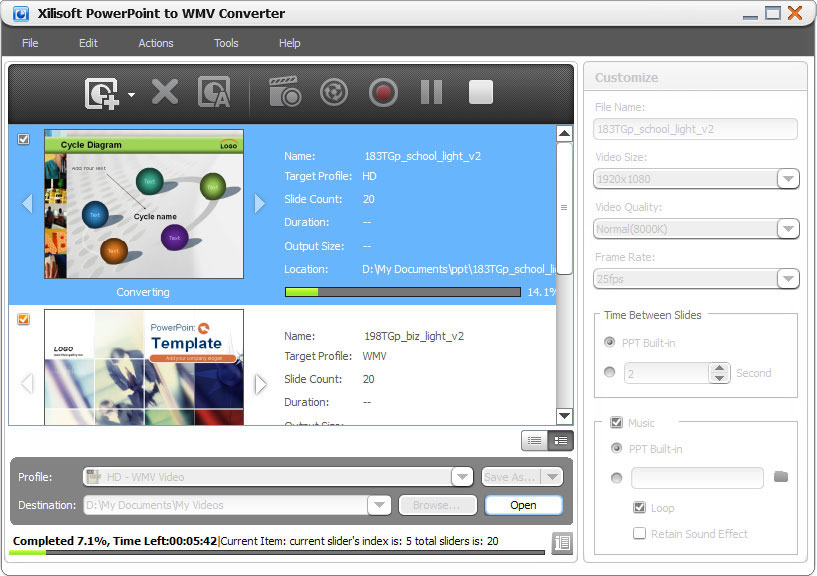

Xilisoft PowerPoint to WMV Converter
Version 1.0.4.1022
Shareware
$25.95
0 downloads
Xilisoft PowerPoint to WMV Converter can convert any
PowerPoint presentation (PPT) file into a video in WMV
or full-definition (HD) 1080p HD-WMV format quickly
and easily without Microsoft PowerPoint. Tailor-made
for converting PPTs to WMV or HD-WMV videos, this
PowerPoint to WMV converter makes it possible to play
your PowerPoint presentations on any multimedia or HD
player capable of playing WMV or HD-WMV videos.
Xilisoft PowerPoint to WMV Converter can also help you
make custom presentation videos.
Features
1.Convert PPTs to WMV format and play them on any WMV
compatible player.
2.Convert PPTs to HD-WMV and make them playable on HD-
WMV players.
3.Rehearse your presentation, record your own
commentary, add background music and then turn it into
a WMV video presentation.
4.Mark your presentation with your own trademark or
logo for copyright protection.
5.Set the transition interval between slides; create
custom WMV video presentation by adjusting parameters
such as the resolution, frame rate, video quality, and
so on.
6.“Express Convert?offers the fastest way to convert a
PPT to WMV video without any slide effects and
animations ?in minutes!
7.Convert several PPTs to WMV format videos at the
same time with batch conversion.
8.All Microsoft PowerPoint file types supported: ppt,
pptx, pptm, ppsx, pps, ppsm, potx, potm, pot.
9.User-friendly interface designed for users of all
levels.
PowerPoint presentation (PPT) file into a video in WMV
or full-definition (HD) 1080p HD-WMV format quickly
and easily without Microsoft PowerPoint. Tailor-made
for converting PPTs to WMV or HD-WMV videos, this
PowerPoint to WMV converter makes it possible to play
your PowerPoint presentations on any multimedia or HD
player capable of playing WMV or HD-WMV videos.
Xilisoft PowerPoint to WMV Converter can also help you
make custom presentation videos.
Features
1.Convert PPTs to WMV format and play them on any WMV
compatible player.
2.Convert PPTs to HD-WMV and make them playable on HD-
WMV players.
3.Rehearse your presentation, record your own
commentary, add background music and then turn it into
a WMV video presentation.
4.Mark your presentation with your own trademark or
logo for copyright protection.
5.Set the transition interval between slides; create
custom WMV video presentation by adjusting parameters
such as the resolution, frame rate, video quality, and
so on.
6.“Express Convert?offers the fastest way to convert a
PPT to WMV video without any slide effects and
animations ?in minutes!
7.Convert several PPTs to WMV format videos at the
same time with batch conversion.
8.All Microsoft PowerPoint file types supported: ppt,
pptx, pptm, ppsx, pps, ppsm, potx, potm, pot.
9.User-friendly interface designed for users of all
levels.
Program details
Publisher
Xilisoft CorporationE-mail
Contact the publisherPlatforms
Windows XPFile size
81780 KBFile date
10/25/2010License
SharewareInstallation
Install & UninstallRecord updated
10/29/2010
