
Chameleon Volume
Version 1.0.0.129
Shareware
$19.95
0 downloads
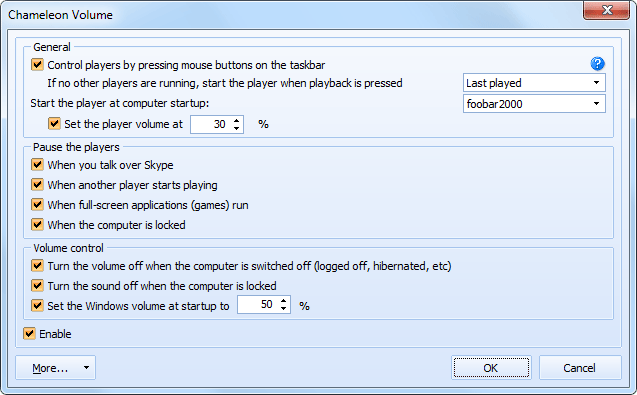
Chameleon Volume synchronizes the work between media
players and Skype and also controls the volume.
Doesn't it annoy you when you receive a call via Skype
while you are listening to music and you have to find
and stop the player? You do not have to do it yourself
anymore, Chameleon Volume will pause it and resume
playback after the call is over.
If you have music playing and want to watch a video,
just start the video and Chameleon Volume will stop
the music for you.
To control players, just use the mouse buttons on the
taskbar: middle button (usually it is a wheel) -
play/pause, the right and left mouse buttons switch to
the next/previous tracks while rotating the wheel
changes the volume.
Chameleon Volume can turn the sound off or pause
playback for the time when the computer is locked, it
can start the player and set the volume at the Windows
startup.
players and Skype and also controls the volume.
Doesn't it annoy you when you receive a call via Skype
while you are listening to music and you have to find
and stop the player? You do not have to do it yourself
anymore, Chameleon Volume will pause it and resume
playback after the call is over.
If you have music playing and want to watch a video,
just start the video and Chameleon Volume will stop
the music for you.
To control players, just use the mouse buttons on the
taskbar: middle button (usually it is a wheel) -
play/pause, the right and left mouse buttons switch to
the next/previous tracks while rotating the wheel
changes the volume.
Chameleon Volume can turn the sound off or pause
playback for the time when the computer is locked, it
can start the player and set the volume at the Windows
startup.
Program details
Publisher
Evgeni ShmakovE-mail
Contact the publisherHome page
http://www.chameleon-managers.com/Platforms
Windows 2000<br>Windows XPFile size
3571 KBFile date
5/18/2011License
SharewareInstallation
Install & UninstallRecord updated
5/19/2011


