
Corrupt File Recovery
Version 3.2
Shareware
$45.00
0 downloads
“How to recover corrupt Docx file?” is the very common
issue which you ever face while using any software.
SysTools is a brand that helps you a lot for corrupt
file recovery. Suppose you are using MS Word 2007 and
facing this kind of issue than you can try a most
preferable solution name as SysTools Docx Repair. It
can recover corrupt word images, tables, texts, styles
etc. Corrupt File Recovery provides a way to recover
corrupt Word images, text, tables with losing original
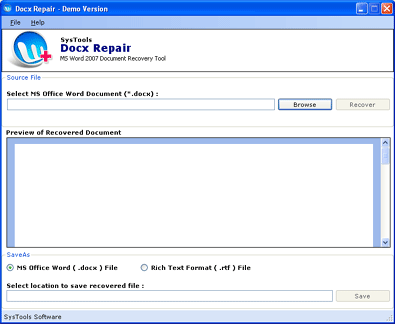
format. How to recover corrupt Docx using this tool?
Just go through the following steps to repair corrupt
Docx.
1. Browse & select the corrupt Word file
2. Click the “Recover” button to preview of
recovered data. There is partial preview available of
recovered data
3. Choose the save option either Docx file or RTF
file
4. Again select location to save the recovered
word file by clicking “Save” button.
issue which you ever face while using any software.
SysTools is a brand that helps you a lot for corrupt
file recovery. Suppose you are using MS Word 2007 and
facing this kind of issue than you can try a most
preferable solution name as SysTools Docx Repair. It
can recover corrupt word images, tables, texts, styles
etc. Corrupt File Recovery provides a way to recover
corrupt Word images, text, tables with losing original
format. How to recover corrupt Docx using this tool?
Just go through the following steps to repair corrupt
Docx.
1. Browse & select the corrupt Word file
2. Click the “Recover” button to preview of
recovered data. There is partial preview available of
recovered data
3. Choose the save option either Docx file or RTF
file
4. Again select location to save the recovered
word file by clicking “Save” button.
Program details
Publisher
Corrupt File RecoveryE-mail
Contact the publisherPlatforms
Windows 98<br>Windows XPFile size
1228 KBFile date
5/27/2011License
SharewareInstallation
Install & UninstallRecord updated
5/27/2011


