
HTPC Remote Control System
Version v1.0.0.2
Shareware
$18.90
0 downloads
What can HTRemoter do for me?
Basic Media Player Control
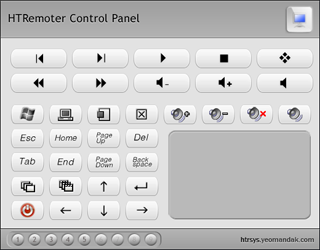
You can easily use HTRemoter to control all Media
Players running on your HTPC. All different Players
are intergrated into a simple control panel with most
frequently-used buttons: Previous, Next, Play/Pause,
Mute, FF, REW.... HTRemoter will automatically detect
the active player and your remote control commands
will be sent to the active one.
Advanced Windows Control
Using HTRemoter, you may temporary forget your
keyboard and mouse when you are enjoying your
Multimedia System. Keyboard and touch pad simulator
let you easily to do almost everything you want to
control the HTPC.
Switch windows, System Volume Control, Computer
Shutdown, Explorer folders, Launch specified
applications...
We don't need RemoteDesktop, we don't need VNC. It's
Basic Media Player Control
You can easily use HTRemoter to control all Media
Players running on your HTPC. All different Players
are intergrated into a simple control panel with most
frequently-used buttons: Previous, Next, Play/Pause,
Mute, FF, REW.... HTRemoter will automatically detect
the active player and your remote control commands
will be sent to the active one.
Advanced Windows Control
Using HTRemoter, you may temporary forget your
keyboard and mouse when you are enjoying your
Multimedia System. Keyboard and touch pad simulator
let you easily to do almost everything you want to
control the HTPC.
Switch windows, System Volume Control, Computer
Shutdown, Explorer folders, Launch specified
applications...
We don't need RemoteDesktop, we don't need VNC. It's
Program details
Publisher
yeoman xuE-mail
Contact the publisherHome page
http://htrsys.yeomandak.com/Platforms
Windows NT 3.x<br>Windows NT 4.x<br>Windows 2000<bFile size
964 KBFile date
6/1/2011License
SharewareInstallation
Install & UninstallRecord updated
1/7/2011


