
Merge Two Outlook Archives
Version 2.5
Shareware
$69.00
0 downloads
If you have problem to merge multiple PST files into
one PST file, you can follow few simple steps and
visualize if they are helpful. The easy solution to
Merge Two Outlook Archives files with SysTools PST
Merge. We recommend you to try this stellar software's
methods:
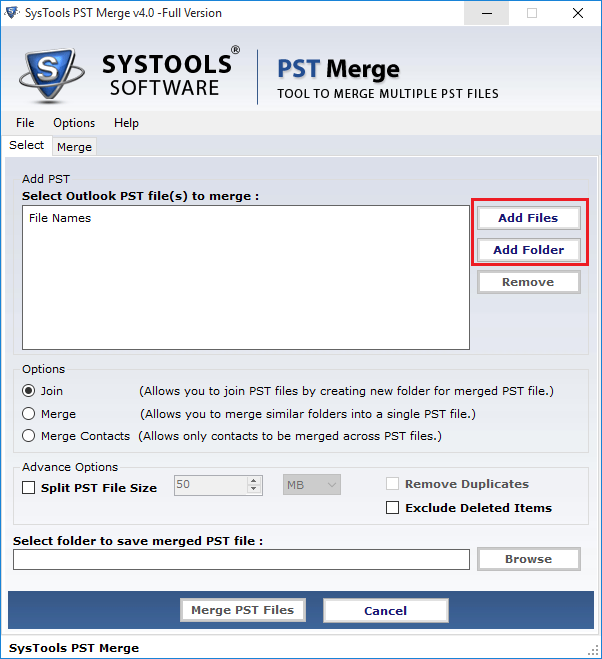
Some steps to Merge Outlook PST:
1. Browse and Select PST file
2. Click on "Merge" button
3. On-screen merging process displayed
4. Preview appeared of merged data
5. Click on "Save" button
6. Select location for saving the file
7. Click "ok"
If you have any confusion in above illustrate steps
then go: www.pstmerge.com. Synchronize MS Outlook PST
software Merge Two Outlook Archives as well as entire
PST like: MS Outlook PST Journals, MS Outlook PST
Calendar, MS Outlook PST To-do list, MS Outlook PST
Contact Information, MS Outlook PST Emails
one PST file, you can follow few simple steps and
visualize if they are helpful. The easy solution to
Merge Two Outlook Archives files with SysTools PST
Merge. We recommend you to try this stellar software's
methods:
Some steps to Merge Outlook PST:
1. Browse and Select PST file
2. Click on "Merge" button
3. On-screen merging process displayed
4. Preview appeared of merged data
5. Click on "Save" button
6. Select location for saving the file
7. Click "ok"
If you have any confusion in above illustrate steps
then go: www.pstmerge.com. Synchronize MS Outlook PST
software Merge Two Outlook Archives as well as entire
PST like: MS Outlook PST Journals, MS Outlook PST
Calendar, MS Outlook PST To-do list, MS Outlook PST
Contact Information, MS Outlook PST Emails
Program details
Publisher
Merge Two Outlook ArchivesE-mail
Contact the publisherPlatforms
Windows 2000<br>Windows XPFile size
2048 KBFile date
7/4/2010License
SharewareInstallation
Install & UninstallRecord updated
4/7/2011


