
Gradient Controls .Net
Version 1.0
Shareware
$49.00
0 downloads
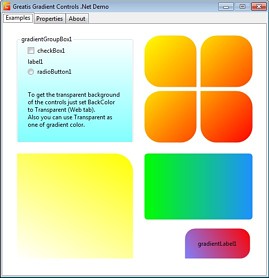
Gradient Controls .Net offers controls with gradient
background feature: GradientLabel, GradientGroupBox,
GradientPanel, GradientFlowLayoutPanel,
GradientTableLayoutPanel.
Each control has class-type Gradient property. With
this class you can choose colors, angle and corner
rounding values for each of gradient control.
Rounding values can be different for each corner, so
you can get any form of gradient area.
Angle property allows you to choose any angle of
gradient, so you can create some pseudo 3D effects if
you need it.
Also you can turn off the default painting (like text
paint in the Label or frame and text painting in the
GroupBox) with DefaultPaint property.
If Enabled is False all the gradient effects are
disabled and control is returned back to the default
view.
Demo project shows some examples of controls using and
allows you to play with Gradient's properties.
background feature: GradientLabel, GradientGroupBox,
GradientPanel, GradientFlowLayoutPanel,
GradientTableLayoutPanel.
Each control has class-type Gradient property. With
this class you can choose colors, angle and corner
rounding values for each of gradient control.
Rounding values can be different for each corner, so
you can get any form of gradient area.
Angle property allows you to choose any angle of
gradient, so you can create some pseudo 3D effects if
you need it.
Also you can turn off the default painting (like text
paint in the Label or frame and text painting in the
GroupBox) with DefaultPaint property.
If Enabled is False all the gradient effects are
disabled and control is returned back to the default
view.
Demo project shows some examples of controls using and
allows you to play with Gradient's properties.
Program details
Publisher
Dmitry VasilievE-mail
Contact the publisherPlatforms
Windows NT 3.x<br>Windows NT 4.x<br>Windows XPFile size
639 KBFile date
1/20/2011License
SharewareInstallation
Install & UninstallRecord updated
1/20/2011