
Recover Doc Document
Version 5.1
Shareware
$45.00
0 downloads
Most of the time, we have to suffer data lose issue.
It becomes very painful when you lost your crucial
data that was created after some months or years.
However, if your data is saved in Doc format, you can
recover it via SysTools Docx Repair. Word File
Recovery can help you to repair Doc file. MS Word
saves all content in Doc file. If your file gets
damage due to corruption, you can't use in future.
Corruption cause of any errors appeared in the time of
opening a file. Few steps required to repair corrupt
word files:
1. Browse and select the corrupted file
2. Select one of the following recovery modes
2.1 Quick Recovery
2.2 Image Recovery
2.3 Salvage Recovery
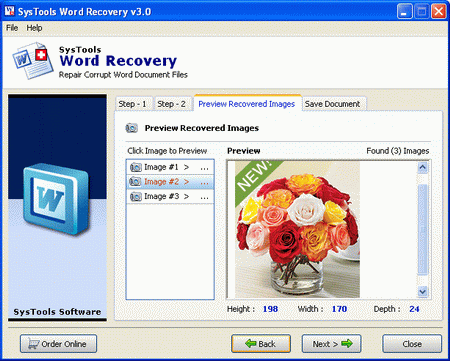
3. Preview of recovered contents
4. Save Documents in the following format
4.1 MS Word (choose one: 95, 97, 2000 or 2002)
4.2 HTML
It becomes very painful when you lost your crucial
data that was created after some months or years.
However, if your data is saved in Doc format, you can
recover it via SysTools Docx Repair. Word File
Recovery can help you to repair Doc file. MS Word
saves all content in Doc file. If your file gets
damage due to corruption, you can't use in future.
Corruption cause of any errors appeared in the time of
opening a file. Few steps required to repair corrupt
word files:
1. Browse and select the corrupted file
2. Select one of the following recovery modes
2.1 Quick Recovery
2.2 Image Recovery
2.3 Salvage Recovery
3. Preview of recovered contents
4. Save Documents in the following format
4.1 MS Word (choose one: 95, 97, 2000 or 2002)
4.2 HTML
Program details
Publisher
Recover Doc DocumentE-mail
Contact the publisherPlatforms
Windows 2000<br>Windows XPFile size
1996 KBFile date
1/4/2011License
SharewareInstallation
Install & UninstallRecord updated
4/1/2011


