
How to Synchronize PST
Version 2.5
Shareware
$69.00
0 downloads
Are you using MS Outlook 2010 and want to merge too
many PST files into one PST file? So Outlook users do
not worry SysTools become with V2.5 how to synchronize
PST software merge Outlook 2010 64 bit into single PST
file. SysTools PST Merge software to merge UNLIMITED
Outlook PST files into one PST. This tool explains how
to synchronize PST process also. How to synchronize PST
software describes the whole merging steps and
features. You just need to follow only some steps to
merge Outlook PST:
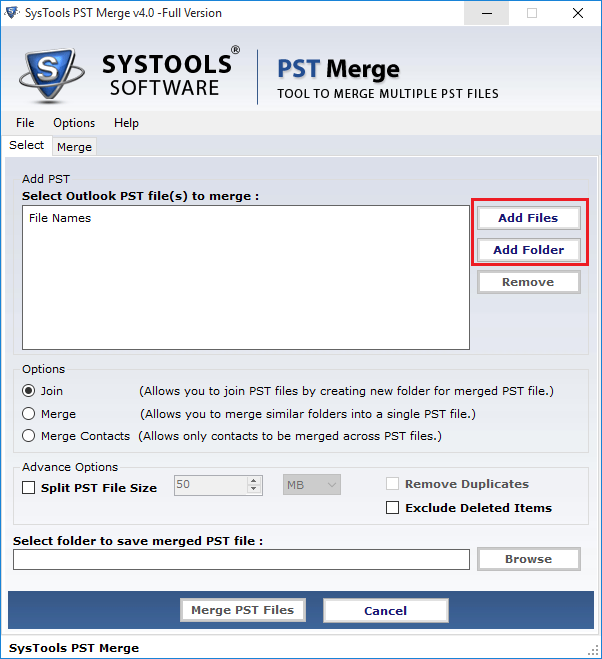
1. Browse and Select PST file
2. Click on "Merge" button
3. On-screen merging process displayed
4. Preview appeared of merged data
5. Click on "Save" button
6. Select location for saving the file
7. Click "ok"
After following this all steps you can easily merge
your Outlook information such as
*MS Outlook Journal,
* MS Outlook Contacts,
* MS Outlook Inbox items,
* MS Outlook Calendar,
* MS Outlook To-do list,
* MS Outlook Email attachments.
SysTools PST Merge software combine multiple PST files
its also merge Unicode and ANSI format. Synchronize PST
files software assigns to mange and maintain all
windows and Outlook version. Merge PST archive files
without any need of technical expertise. Before take
any action you need to just try our Product valuing
version, which is costless to merge five Outlook PST
files into single PST. Now the time is judge from
demonstration if you suitable with performance and
working efficiency of software buy Full fledged
process. Pay $69 for Personal License and $199 for
Business License. If you require any technical support
you can talk and chat with our support services
available 24X7.
many PST files into one PST file? So Outlook users do
not worry SysTools become with V2.5 how to synchronize
PST software merge Outlook 2010 64 bit into single PST
file. SysTools PST Merge software to merge UNLIMITED
Outlook PST files into one PST. This tool explains how
to synchronize PST process also. How to synchronize PST
software describes the whole merging steps and
features. You just need to follow only some steps to
merge Outlook PST:
1. Browse and Select PST file
2. Click on "Merge" button
3. On-screen merging process displayed
4. Preview appeared of merged data
5. Click on "Save" button
6. Select location for saving the file
7. Click "ok"
After following this all steps you can easily merge
your Outlook information such as
*MS Outlook Journal,
* MS Outlook Contacts,
* MS Outlook Inbox items,
* MS Outlook Calendar,
* MS Outlook To-do list,
* MS Outlook Email attachments.
SysTools PST Merge software combine multiple PST files
its also merge Unicode and ANSI format. Synchronize PST
files software assigns to mange and maintain all
windows and Outlook version. Merge PST archive files
without any need of technical expertise. Before take
any action you need to just try our Product valuing
version, which is costless to merge five Outlook PST
files into single PST. Now the time is judge from
demonstration if you suitable with performance and
working efficiency of software buy Full fledged
process. Pay $69 for Personal License and $199 for
Business License. If you require any technical support
you can talk and chat with our support services
available 24X7.
Program details
Publisher
How to Synchronize PSTE-mail
Contact the publisherPlatforms
Windows 95<br>Windows 98<br>Windows 2000<br>WindowFile size
2048 KBFile date
3/24/2011License
SharewareExpiration info
Installation
Install & UninstallRecord updated
3/24/2011


