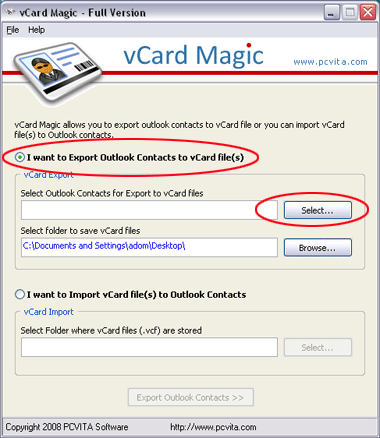

How to Export a vCard From Outlook 2007
Version 2.2
Shareware
$49.00
0 downloads
How to Export a vCard from Outlook 2007 in any numbers
of contact. PCVITA vCard Magic software is world wide
solution to export multiple vCard at a time. You have
another option to export one by one vCard file at a
time by following steps:
- Open your MS Outlook application
- Open your contact which you want to export
- Go to the file menu >> Save as >> Export to vCard
File
- Select the location and save the vCard file.
By using these steps you can easily export your
contacts one by one as well as not any permission to
export your contact in bulk. It cause wasting your
precious time and follow the long procedures to export
your contacts. PCVITA vCard Magic software is fully
professional software to export multiple bulk of
contacts with in just easy clicks. Software easily and
securely exports as well as export contacts from vCard
to Outlook 2007/2003/2010. To get better information
of contact. PCVITA vCard Magic software is world wide
solution to export multiple vCard at a time. You have
another option to export one by one vCard file at a
time by following steps:
- Open your MS Outlook application
- Open your contact which you want to export
- Go to the file menu >> Save as >> Export to vCard
File
- Select the location and save the vCard file.
By using these steps you can easily export your
contacts one by one as well as not any permission to
export your contact in bulk. It cause wasting your
precious time and follow the long procedures to export
your contacts. PCVITA vCard Magic software is fully
professional software to export multiple bulk of
contacts with in just easy clicks. Software easily and
securely exports as well as export contacts from vCard
to Outlook 2007/2003/2010. To get better information
Program details
Publisher
vCard Export SoftwareE-mail
Contact the publisherPlatforms
Windows 98<br>Windows XPFile size
1679 KBFile date
11/2/2012License
SharewareInstallation
Install & UninstallRecord updated
2/11/2012


