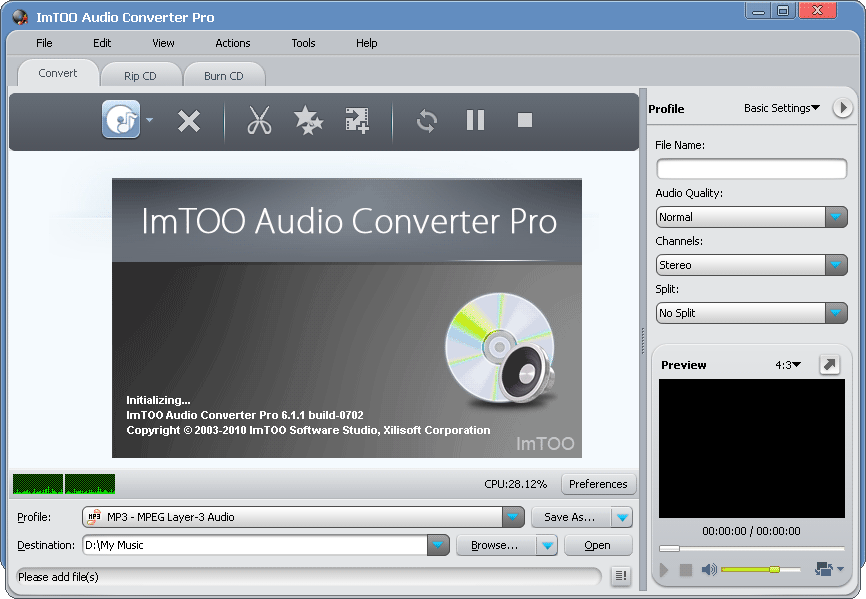

ImTOO Audio Converter Pro
Version 6.5.0.20131230
Shareware
$39.95
2 downloads
Including the functionalities of audio conversion,
audio extraction, CD ripping and CD burning, ImTOO
Audio Converter Pro provides you with the most
comprehensive solutions to convert between different
audio formats (incl. MP3, WMA, WAV, AAC, FLAC, OGG,
APE, etc.), extract audio from popular HD and general
video formats such as AVI, MPEG, WMV, MP4, FLV, MKV,
H.264/MPEG-4 AVC, AVCHD, rip CDs to music files and
burn music CD from audio files.
New features:
1.Support display and edit ID3 V2 information (users
can attach cover, lyric and etc information for the
music file).
2.Add more profiles.
3.Retrieve general information of CDs.
4.Utilize installer to reduce the installation time.
Features:
1.Convert between different audio formats including
MP3, WMA, WAV, AAC, FLAC, OGG, APE.
2.Extract audio from video files in all popular
general and HD video formats including AVI, MPEG, WMV,
MP4, FLV, MKV, H.264/MPEG-4 AVC, AVCHD.
3.Rip CDs to music files in any popular audio format
of your choice.
4.Burn your favorite songs onto CD for playback on CD
players or backup.
5.Set effects (incl. fade-in, fade-out, volume
normalize, band pass, chorus, flanger, echo and speed)
for the outputted audio files.
6.Convert/rip and transfer CDs/videos/audio to your
iPod, iPhone and PSP in one step.
7.Output various format files from a single
video/audio file or CD track at one time.
8.Extract audio segments by clipping.
9.Split your audio tracks in accordance with the split
size or duration you preset before converting, ripping
or burning.
10.Change the audio profile parameters for output
customization; edit ID3 tag info of your audio tracks.
11.Supports multiple CPU cores, multi-threading and
batch process to speed up and simplify the conversion,
ripping and burning.
12.Options to auto exit application, shut down,
hibernate, stand by system, or do nothing after
conversion.
13.Comes with English, German, Spanish, French,
Japanese, Chinese interface languages.
audio extraction, CD ripping and CD burning, ImTOO
Audio Converter Pro provides you with the most
comprehensive solutions to convert between different
audio formats (incl. MP3, WMA, WAV, AAC, FLAC, OGG,
APE, etc.), extract audio from popular HD and general
video formats such as AVI, MPEG, WMV, MP4, FLV, MKV,
H.264/MPEG-4 AVC, AVCHD, rip CDs to music files and
burn music CD from audio files.
New features:
1.Support display and edit ID3 V2 information (users
can attach cover, lyric and etc information for the
music file).
2.Add more profiles.
3.Retrieve general information of CDs.
4.Utilize installer to reduce the installation time.
Features:
1.Convert between different audio formats including
MP3, WMA, WAV, AAC, FLAC, OGG, APE.
2.Extract audio from video files in all popular
general and HD video formats including AVI, MPEG, WMV,
MP4, FLV, MKV, H.264/MPEG-4 AVC, AVCHD.
3.Rip CDs to music files in any popular audio format
of your choice.
4.Burn your favorite songs onto CD for playback on CD
players or backup.
5.Set effects (incl. fade-in, fade-out, volume
normalize, band pass, chorus, flanger, echo and speed)
for the outputted audio files.
6.Convert/rip and transfer CDs/videos/audio to your
iPod, iPhone and PSP in one step.
7.Output various format files from a single
video/audio file or CD track at one time.
8.Extract audio segments by clipping.
9.Split your audio tracks in accordance with the split
size or duration you preset before converting, ripping
or burning.
10.Change the audio profile parameters for output
customization; edit ID3 tag info of your audio tracks.
11.Supports multiple CPU cores, multi-threading and
batch process to speed up and simplify the conversion,
ripping and burning.
12.Options to auto exit application, shut down,
hibernate, stand by system, or do nothing after
conversion.
13.Comes with English, German, Spanish, French,
Japanese, Chinese interface languages.
Program details
Publisher
ImTOO CorporationE-mail
Contact the publisherPlatforms
Windows XPFile size
32359 KBFile date
12/30/2013License
SharewareInstallation
Install & UninstallRecord updated
12/30/2013


