
4Media YouTube to iPod Converter
Version 3.0.1.0309
Shareware
$25.99
0 downloads
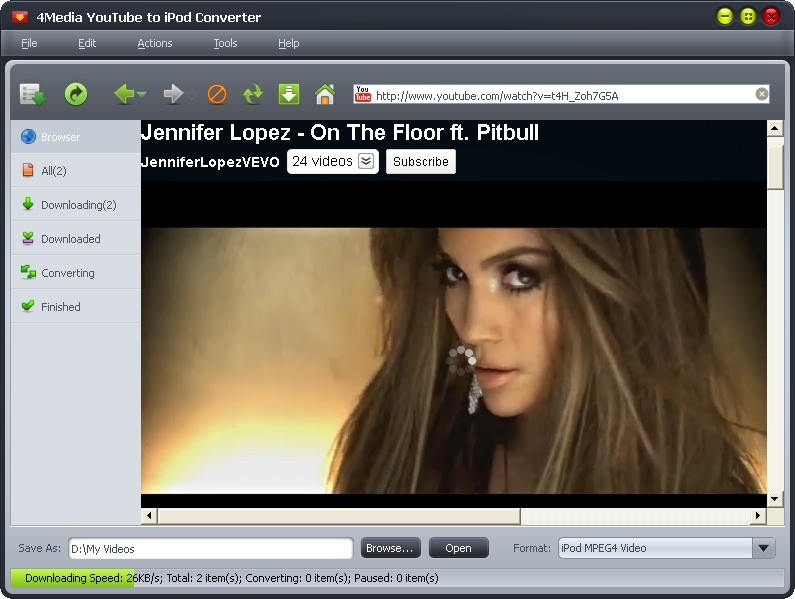
4Media YouTube to iPod Converter is the quickest way
to download YouTube videos and convert YouTube video
to iPod/iPhone MP4/MPEG-4 videos directly in one step.
This YouTube to iPod downloader can batch download
YouTube videos to iPod/iPhone at super fast speed in
different ways (drag and drop, download from IR right-
click menu, in the built-in browser), just enjoy them
offline on your iPod/iPhone anywhere anytime.
New features:
Better support for YouTube.
Key features:
1.Download multiple YouTube video files and convert
YouTube video to iPod videos in batches at the highest
speed.
2.Convert YouTube FLV videos from your local disk to
iPod/iPhone MP4 videos at fast speed.
3.Drag and drop to download and convert YouTube
videos.
4.View YouTube videos by different categories, search
and download YouTube videos you like in the built-in
browser.
5.Download YouTube videos directly with IE right-click
menu option.
6.Support setting proxy server to download YouTube
videos.
7.Allow you to view the info of downloaded file: bit
rate, frame rate, sample rate, etc.
8.Set the max task number, highest speed and priority
according to your CPU configuration to get the optimal
speed.
9.Provide several after done actions: shut down,
hibernate, stand by, and quit.
10.Check for software updates automatically at
intervals of the period you set.
11.Multi-language interface: English, German, French,
Japanese and Chinese.
to download YouTube videos and convert YouTube video
to iPod/iPhone MP4/MPEG-4 videos directly in one step.
This YouTube to iPod downloader can batch download
YouTube videos to iPod/iPhone at super fast speed in
different ways (drag and drop, download from IR right-
click menu, in the built-in browser), just enjoy them
offline on your iPod/iPhone anywhere anytime.
New features:
Better support for YouTube.
Key features:
1.Download multiple YouTube video files and convert
YouTube video to iPod videos in batches at the highest
speed.
2.Convert YouTube FLV videos from your local disk to
iPod/iPhone MP4 videos at fast speed.
3.Drag and drop to download and convert YouTube
videos.
4.View YouTube videos by different categories, search
and download YouTube videos you like in the built-in
browser.
5.Download YouTube videos directly with IE right-click
menu option.
6.Support setting proxy server to download YouTube
videos.
7.Allow you to view the info of downloaded file: bit
rate, frame rate, sample rate, etc.
8.Set the max task number, highest speed and priority
according to your CPU configuration to get the optimal
speed.
9.Provide several after done actions: shut down,
hibernate, stand by, and quit.
10.Check for software updates automatically at
intervals of the period you set.
11.Multi-language interface: English, German, French,
Japanese and Chinese.
Program details
Publisher
4Media Software StudioE-mail
Contact the publisherPlatforms
Windows XPFile size
15755 KBFile date
3/22/2011License
SharewareInstallation
Install & UninstallRecord updated
8/11/2011
