
Exe Icon Changer Downloader
Version 7.1133
Freeware
Free
1 downloads
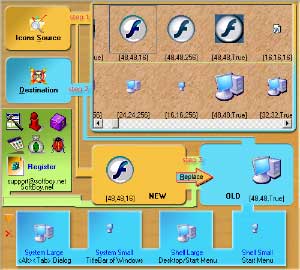
The tool can replace the icon in the executable file
easily very much ! Even the executable file compressed
or the size of the icon is inconsistent, he can
replace easily! It can also change the icon of other
executable file types such as Dll, Ocx, Scr and so on.
The icon of folder and driver can be changed by Exe
Icon Changer too. If you want to extract and save the
icons in exe file, Exe Icons Changer will be your
first choice. It can save the icon as two formats: bmp
and ico.The Function Lists of Exe Icon Changer 1.
Replace all kinds of executable Icons and permit to
take place of any icons in different sizes. The
substitute Icons can be choosen from Icon files or
other executable files. 2. Find out all icons from
the executable files and save them with Icon type
(*.ico) or Bitmap type (*.bmp).3. The functions of
backup and restoring icon.4. Change the icons of
folders or drivers.
easily very much ! Even the executable file compressed
or the size of the icon is inconsistent, he can
replace easily! It can also change the icon of other
executable file types such as Dll, Ocx, Scr and so on.
The icon of folder and driver can be changed by Exe
Icon Changer too. If you want to extract and save the
icons in exe file, Exe Icons Changer will be your
first choice. It can save the icon as two formats: bmp
and ico.The Function Lists of Exe Icon Changer 1.
Replace all kinds of executable Icons and permit to
take place of any icons in different sizes. The
substitute Icons can be choosen from Icon files or
other executable files. 2. Find out all icons from
the executable files and save them with Icon type
(*.ico) or Bitmap type (*.bmp).3. The functions of
backup and restoring icon.4. Change the icons of
folders or drivers.
Program details
Publisher
Ad WareE-mail
Contact the publisherHome page
http://softboy.net/exeico/index.htmPlatforms
Windows 98<br>Windows XPFile size
1748 KBFile date
8/29/2011License
FreewareInstallation
Install & UninstallRecord updated
9/5/2011


