
JunkAssist for Outlook
Version 2.0
Shareware
$29.90
0 downloads
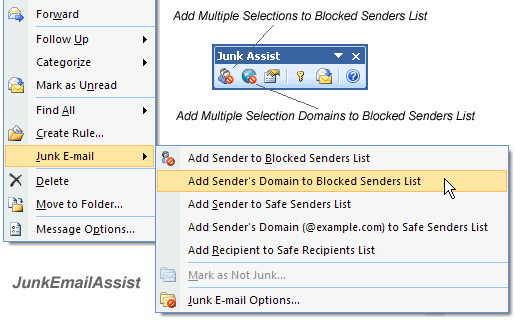
JunkAssist Adds Add Sender's Domain to Blocked Senders
List to the Junk E-mail submenu in the context menu of
Outlook. With Add Sender's Domain to Blocked Senders
List, you can add the sender's domain to Blocked
Senders List easily and quickly.
Add Senders to Blocked Senders List only allows a
single selection. At times we have several spams in
our E-mail folder. It's time-consuming to add the
senders to Blocked Senders List one by one. You can
select the spams and use JunkAssist to add those
senders or domains to Blocked Senders List with one
button.
You can add hotmail.com or yahoo.com to the safe
domain list of JunkAssist. JunkAssist will never add
those domains to Blocked Senders List. It just add the
senders to Blocked Senders List.
Also you can use JunkAssist to search and convert the
blocked E-mail addresses to the domains in Outlook
List to the Junk E-mail submenu in the context menu of
Outlook. With Add Sender's Domain to Blocked Senders
List, you can add the sender's domain to Blocked
Senders List easily and quickly.
Add Senders to Blocked Senders List only allows a
single selection. At times we have several spams in
our E-mail folder. It's time-consuming to add the
senders to Blocked Senders List one by one. You can
select the spams and use JunkAssist to add those
senders or domains to Blocked Senders List with one
button.
You can add hotmail.com or yahoo.com to the safe
domain list of JunkAssist. JunkAssist will never add
those domains to Blocked Senders List. It just add the
senders to Blocked Senders List.
Also you can use JunkAssist to search and convert the
blocked E-mail addresses to the domains in Outlook
Program details
Publisher
Sean BlueE-mail
Contact the publisherPlatforms
Windows XPFile size
832 KBFile date
9/19/2010License
SharewareInstallation
Install & UninstallRecord updated
10/18/2011


