
Picacha
Version 1.7
Freeware
Free
0 downloads
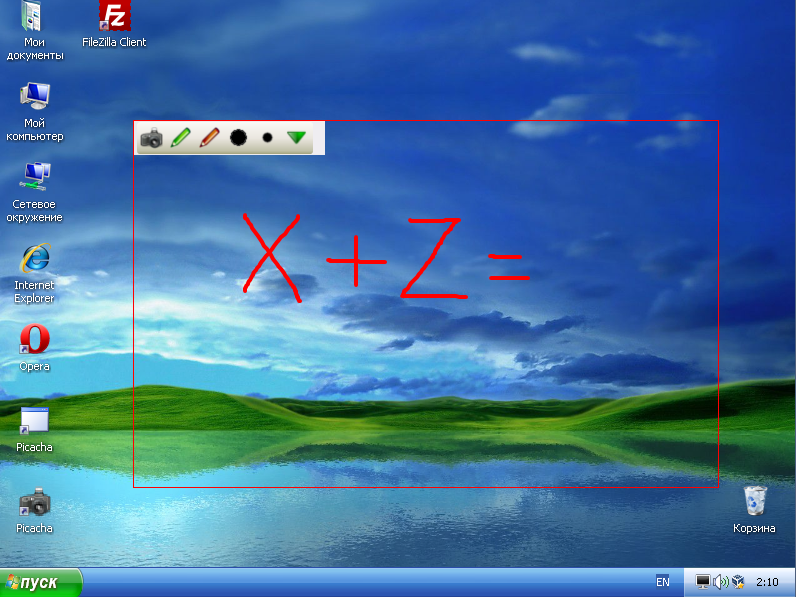
Picacha enables to make a quick screenshot and share
to online. Share a screenshot in just 3 seconds.
It is very easy:
1. Drag your mouse to grab the screen.
2. Copy the link
3. Share with your friends and colleagues
You no longer need to spend time on image editing and
hosting, Picacha it will do for you.
You will only to use the Picacha and enjoy.
Picacha absolutely free!
The main functions:
1) Quick screenshot - get link to a screenshot in 3
clicks.
2) Screenshot with a marker.
Before you make a screenshot you can make the
necessary notes on-screen marker, and then share a
link to a screenshot with everybody.
3) Multi-part screenshot
4) Create the animation from screenshots or any other
to online. Share a screenshot in just 3 seconds.
It is very easy:
1. Drag your mouse to grab the screen.
2. Copy the link
3. Share with your friends and colleagues
You no longer need to spend time on image editing and
hosting, Picacha it will do for you.
You will only to use the Picacha and enjoy.
Picacha absolutely free!
The main functions:
1) Quick screenshot - get link to a screenshot in 3
clicks.
2) Screenshot with a marker.
Before you make a screenshot you can make the
necessary notes on-screen marker, and then share a
link to a screenshot with everybody.
3) Multi-part screenshot
4) Create the animation from screenshots or any other
Program details
Publisher
Maks VasilievE-mail
Contact the publisherHome page
http://softkumir.ru/picacha/Platforms
Windows 2000<br>Windows XP<br>Windows CE 1.0<br>WiFile size
1160 KBFile date
2/17/2012License
FreewareInstallation
Install & UninstallRecord updated
2/18/2012

