
Convert Outlook PST Emails to DOC
Version 3.1
Shareware
$49.00
0 downloads
Since, to manage a heap of PST emails is a very tidy
task. But when we have the option to convert PST
emails to DOC then it is very easy for user to manage
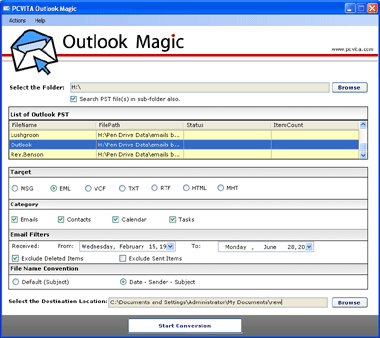
these bulk PST emails. Through PCVITA Outlook Magic a
user can convert outlook PST emails to DOC
conveniently. By selecting the appropriate options
user can get the desired result. Subsequent steps have
to follow to achieve the goals and they are mentioned
below:
1. Open the Outlook Magic Software
2. Select the outlook PST emails, which you would
like to convert
3. Select the RTF option in the software
4. Give the Target File Name Convention and
destination location
5. Click on “Start Conversion” in order to start
the process
Note: No software in the market is available to
convert your PST emails to DOC format directly. For
DOC, users have to save the file in RTF option and
then open the file in DOC Format. So beware from
task. But when we have the option to convert PST
emails to DOC then it is very easy for user to manage
these bulk PST emails. Through PCVITA Outlook Magic a
user can convert outlook PST emails to DOC
conveniently. By selecting the appropriate options
user can get the desired result. Subsequent steps have
to follow to achieve the goals and they are mentioned
below:
1. Open the Outlook Magic Software
2. Select the outlook PST emails, which you would
like to convert
3. Select the RTF option in the software
4. Give the Target File Name Convention and
destination location
5. Click on “Start Conversion” in order to start
the process
Note: No software in the market is available to
convert your PST emails to DOC format directly. For
DOC, users have to save the file in RTF option and
then open the file in DOC Format. So beware from
Program details
Publisher
Convert Outlook PST Emails to DOCE-mail
Contact the publisherPlatforms
Windows 98<br>Windows XPFile size
1914 KBFile date
9/11/2011License
SharewareInstallation
Install & UninstallRecord updated
11/9/2011


