
How to Fix Exchange Server Error
Version 2.1
Shareware
$249.00
0 downloads
How to fix Exchange Server error? It is the common
question which has arise at the time when Exchange
Server gets corrupted. Exchange to Outlook software of
Recover Data is an excellent solution to fix Exchange
Server corruption & get rid from this problem. With the
help of it, you can fix Jet engine errors & recover EDB
data at the time of inaccessibility in EDB file.
Exchange to Outlook conversion tool able to fix
Exchange database file errors before converting
single/multiple Exchange user mailboxes data (from Top
of Information Store folder, Schedule, Spooler Queue,
Views & other folders). It enables to recover EDB data
over 16GB maximum limit error of EDB file. With the
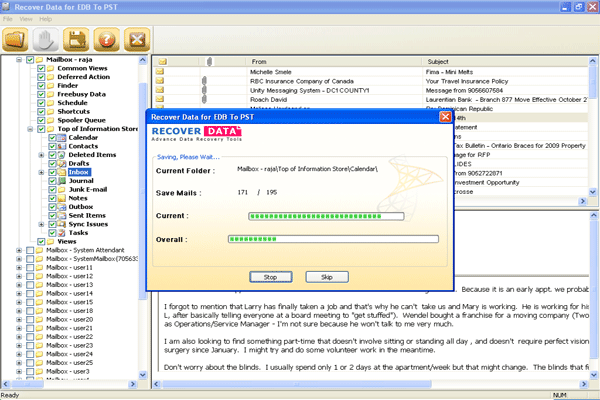
evaluation version of Recover Data for EDB to PST
software you can see the process that how our software
can remove Jet engine error & then convert or recovered
EDB data in a fresh PST file of MS Outlook. For more
information, follow this URL:
http://www.recoverdatatools.com/how-to-fix-exchange-server-error.html
question which has arise at the time when Exchange
Server gets corrupted. Exchange to Outlook software of
Recover Data is an excellent solution to fix Exchange
Server corruption & get rid from this problem. With the
help of it, you can fix Jet engine errors & recover EDB
data at the time of inaccessibility in EDB file.
Exchange to Outlook conversion tool able to fix
Exchange database file errors before converting
single/multiple Exchange user mailboxes data (from Top
of Information Store folder, Schedule, Spooler Queue,
Views & other folders). It enables to recover EDB data
over 16GB maximum limit error of EDB file. With the
evaluation version of Recover Data for EDB to PST
software you can see the process that how our software
can remove Jet engine error & then convert or recovered
EDB data in a fresh PST file of MS Outlook. For more
information, follow this URL:
http://www.recoverdatatools.com/how-to-fix-exchange-server-error.html
Program details
Publisher
Fix Jet Engine ErrorsE-mail
Contact the publisherPlatforms
Windows 3.x<br>Windows 95<br>Windows 98<br>WindowsFile size
2078 KBFile date
1/19/2012License
SharewareExpiration info
Installation
Install & UninstallRecord updated
1/20/2012