
Copy Text Contents
Version 1.0
Freeware
Free
0 downloads
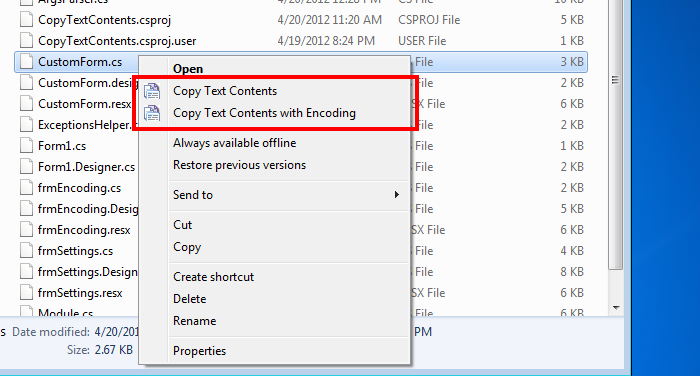
4dots Copy Text Contents is a small shell extension
that extends the right click menu of Windows Explorer
and allows you to copy directly the contents of text
files to the clipboard.
This is useful when you just need to quickly copy to
the clipboard the contents,for example, of source code
files or other text files, in order to paste them
elsewhere.
One or multiple files can be selected and entire
folders.
You can use the default encoding to read the files or
you can specify the encoding explicitly.
If multiple files are selected you can optionally add
file headers to the text.
Moreover, when selecting a folder you have the option
to include also its subfolders files.
that extends the right click menu of Windows Explorer
and allows you to copy directly the contents of text
files to the clipboard.
This is useful when you just need to quickly copy to
the clipboard the contents,for example, of source code
files or other text files, in order to paste them
elsewhere.
One or multiple files can be selected and entire
folders.
You can use the default encoding to read the files or
you can specify the encoding explicitly.
If multiple files are selected you can optionally add
file headers to the text.
Moreover, when selecting a folder you have the option
to include also its subfolders files.
Program details
Publisher
Alexander TriantafyllouE-mail
Contact the publisherPlatforms
Windows 2000<br>Windows XPFile size
8391 KBFile date
4/30/2012License
FreewareInstallation
Install & UninstallRecord updated
5/2/2012


