
Windows 8 Password Recovery
Version 1.0.1
Shareware
$19.95
0 downloads
"I forgot my windows 8 password on my computer. Can
anyone give me some tips to help me recover the lost
password?"
When you forget your windows 8 login password, you can
use Windows 8 password recovery tool to recover it. If
you have ever enabled the hidden administrator account
on your computer, there is a best way for you to
recover the lost password.
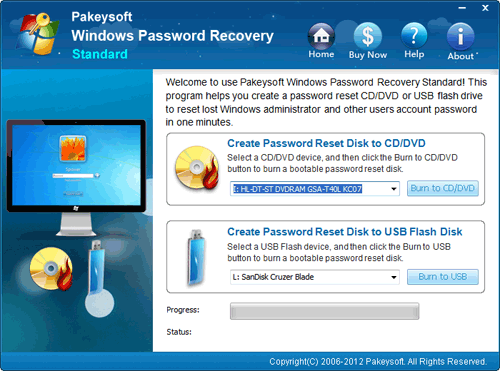
First you need to prepare a password recovery disk
burned from a Windows password Recovery program.
Pakeysoft Windows Password Recovery can be a good
option, which can help you access your computer and
let you remove the password. Not only for Windows 8,
this program also works well on Windows 7, Vista, XP,
2008, 2003 and 2000.
Step 1. Burn a bootable Windows 8 password recovery
disk.
Step 2. Boot your computer with the Windows 8 recovery
disk.
Step 3. Recover Windows 8 password.
For more info visit to our site: http://www.password-
anyone give me some tips to help me recover the lost
password?"
When you forget your windows 8 login password, you can
use Windows 8 password recovery tool to recover it. If
you have ever enabled the hidden administrator account
on your computer, there is a best way for you to
recover the lost password.
First you need to prepare a password recovery disk
burned from a Windows password Recovery program.
Pakeysoft Windows Password Recovery can be a good
option, which can help you access your computer and
let you remove the password. Not only for Windows 8,
this program also works well on Windows 7, Vista, XP,
2008, 2003 and 2000.
Step 1. Burn a bootable Windows 8 password recovery
disk.
Step 2. Boot your computer with the Windows 8 recovery
disk.
Step 3. Recover Windows 8 password.
For more info visit to our site: http://www.password-
Program details
Publisher
Windows 8 Password RecoveryE-mail
Contact the publisherPlatforms
Windows 98<br>Windows XPFile size
29744 KBFile date
5/19/2012License
SharewareInstallation
Install & UninstallRecord updated
5/19/2012