
SSRS Backup and Export
Version 2.0
Shareware
$149.00
0 downloads
The Easy Way to Export and backup SSRS Reports:
Use SSRS Backup and Export
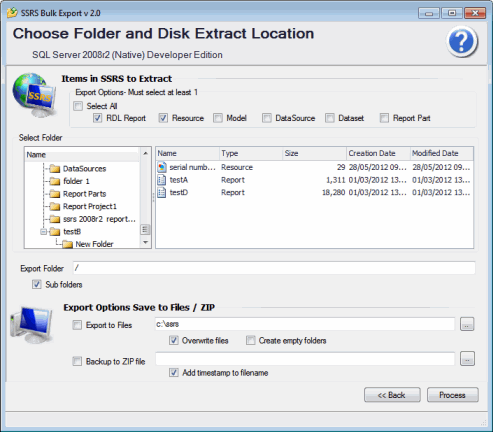
Enter your report server URL
Select the SSRS folder from a tree view.
Optional To include sub folders tick box marked -
Include sub folders.
In Folder to Save RDL's section enter the your chosen
destination folder.
Press Process button
Check choices in Log file and press export button.
Calculate your return on investment in minutes.
It really is that simple!
Works with all versions of SSRS including SQL Azure
Reporting. Bulk export items from SSRS Server to disk.
Brick level backup of your SSRS items. Save exported
items to zip file Export Reports and resources from a
single SSRS folder or folder and sub folders. All SSRS
versions supported SQL Server 2000- 2008 r2 Works with
SSRS Native mode and SSRS Integrated mode Take
snapshots of items in SSRS. Can choose another user to
Use SSRS Backup and Export
Enter your report server URL
Select the SSRS folder from a tree view.
Optional To include sub folders tick box marked -
Include sub folders.
In Folder to Save RDL's section enter the your chosen
destination folder.
Press Process button
Check choices in Log file and press export button.
Calculate your return on investment in minutes.
It really is that simple!
Works with all versions of SSRS including SQL Azure
Reporting. Bulk export items from SSRS Server to disk.
Brick level backup of your SSRS items. Save exported
items to zip file Export Reports and resources from a
single SSRS folder or folder and sub folders. All SSRS
versions supported SQL Server 2000- 2008 r2 Works with
SSRS Native mode and SSRS Integrated mode Take
snapshots of items in SSRS. Can choose another user to
Program details
Publisher
Louise JallowE-mail
Contact the publisherPlatforms
Windows 2000<br>Windows XPFile size
11439 KBFile date
5/29/2012License
SharewareInstallation
Install & UninstallRecord updated
5/31/2012


