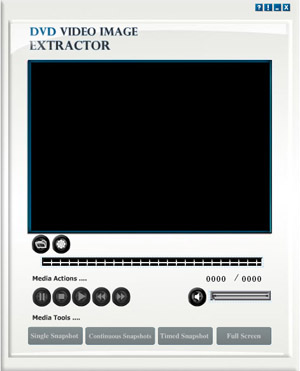

BHT DVD Video Image Extractor
Version 1.0.0.6
Freeware
Free
0 downloads
DVD Video Image Extractor is an easy-to-use
application to easily and effectively extract or
capture images from your favorite DVD-Video discs. You
can extract one image while playing your favorite
movie and also you can extract a portion of the DVD-
Video. It supports three tools for capturing snapshots
which are Single snapshot, Continuous snapshots and
Timed snapshots. By Single snapshot you can capture a
single snapshot from the video and continuous
snapshots allows you to capture a portion of the video
as a sequence of images. Timed snapshots allows you to
capture snapshots every certain amount of
milliseconds.The main window is composed of three main
parts: Media Actions, Media Tools and the Main Menu
Bar. In Media Actions you will see a collection of
buttons which includes the main media commands which
are: rewind, play, pause, stop and fast forward. Also
in the right side, you will find a button for turning
audio on/off and a slider for setting the desired
volume level. You should also notice the bar
above “Media Actions” which shows the progress of the
application to easily and effectively extract or
capture images from your favorite DVD-Video discs. You
can extract one image while playing your favorite
movie and also you can extract a portion of the DVD-
Video. It supports three tools for capturing snapshots
which are Single snapshot, Continuous snapshots and
Timed snapshots. By Single snapshot you can capture a
single snapshot from the video and continuous
snapshots allows you to capture a portion of the video
as a sequence of images. Timed snapshots allows you to
capture snapshots every certain amount of
milliseconds.The main window is composed of three main
parts: Media Actions, Media Tools and the Main Menu
Bar. In Media Actions you will see a collection of
buttons which includes the main media commands which
are: rewind, play, pause, stop and fast forward. Also
in the right side, you will find a button for turning
audio on/off and a slider for setting the desired
volume level. You should also notice the bar
above “Media Actions” which shows the progress of the
Program details
Publisher
Boston HiTechE-mail
Contact the publisherPlatforms
Windows 98<br>Windows XPFile size
15232 KBFile date
2/9/2012License
FreewareInstallation
Install & UninstallRecord updated
9/2/2012


