
ZM Image Viewer
Version 3.0.0.4
Freeware
Free
0 downloads
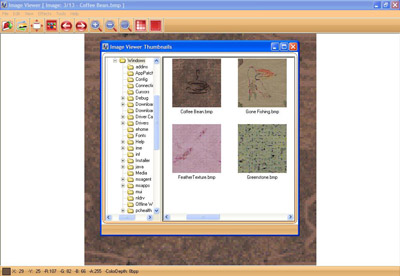
Image Viewer is the powerful, compact and easy-to-use
image viewer you can use. With Image Viewer you can do
the following:- 1- Open a lot of image file formats
like
JPG,BMP,GIF,TIFF,PNG,PSD,PCX,TGA,WMF,EMF,WBMP,ICO,DIB.
2- Open images also from URL and save them to your
disk. 3- Save to several image formats like JPG, BMP,
GIF, TIFF, PNG…etc. 4- View images in full screen mode
and slideshow mode. 5- View and browse images in
Thumbnails view. 5- View and browse images in
Thumbnails view. 6- Copy, Cut and Paste images and
portions of images. 7- Do some powerful effects like
Crop, Resize, Flip, Rotate, Skew, Brightness and
Contrast. From the general settings tab you can adjust
the following options: 1- Background color of the
viewer, click on the color button and choose the
desired color and press ok. 2- Specify if the viewer
loops around image files while browsing if reaching
the end or begin of files. 3- Fit image during
browsing. In the Full Screen Settings tab you can set
the options of the full screen mode as follow: 1-
image viewer you can use. With Image Viewer you can do
the following:- 1- Open a lot of image file formats
like
JPG,BMP,GIF,TIFF,PNG,PSD,PCX,TGA,WMF,EMF,WBMP,ICO,DIB.
2- Open images also from URL and save them to your
disk. 3- Save to several image formats like JPG, BMP,
GIF, TIFF, PNG…etc. 4- View images in full screen mode
and slideshow mode. 5- View and browse images in
Thumbnails view. 5- View and browse images in
Thumbnails view. 6- Copy, Cut and Paste images and
portions of images. 7- Do some powerful effects like
Crop, Resize, Flip, Rotate, Skew, Brightness and
Contrast. From the general settings tab you can adjust
the following options: 1- Background color of the
viewer, click on the color button and choose the
desired color and press ok. 2- Specify if the viewer
loops around image files while browsing if reaching
the end or begin of files. 3- Fit image during
browsing. In the Full Screen Settings tab you can set
the options of the full screen mode as follow: 1-
Program details
Publisher
Zero MalwareE-mail
Contact the publisherPlatforms
Windows 98<br>Windows XPFile size
7029 KBFile date
6/14/2012License
FreewareInstallation
Install & UninstallRecord updated
6/14/2012
