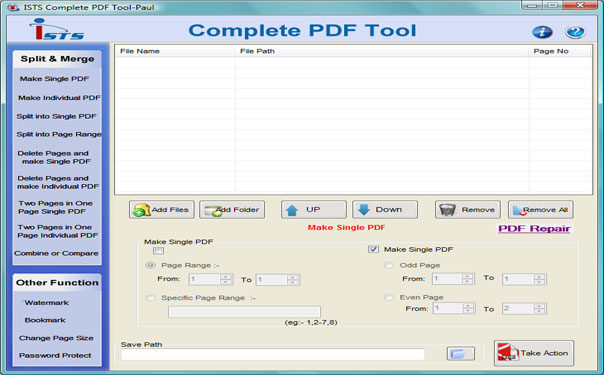

Combine PDF Pages
Version 2.8.0.4
Shareware
$29.85
0 downloads
Combine PDF Pages Tool can great safe and simple to use
merge. Merger Document use merging more than one page
and Combine two join programs. Split Documents software
for group use to working on pages such as split merges,
combine, and join of some adobe. Merging also can be
used to merge several documents. Joining application
compare two singular files in one platform and change
breaking pages into single or many pages. Splitter
utility generates facility can arrange, add, join, and
merge, combine and cut pages. Joiner adobes maker
breaks Files into single document. PDFs combine several
pages existing any in similar or multiple locations.
Combining Files program single Merger tool is many
document combine add Watermarking, bookmarking adobe
reader. PDFs splitter also supports collection file for
split and merge. Merge and Split utility supports with
all Windows platform like Win2000, Win7 x32 and Win7 x
64, Win98, Win Vista, Win Vista x64 and Win XP.
Combine PDF Pages Features:
* Joining PDF Files software generates facility can
arrange, add, join, and merge, combine and cut pages.
* Combining application allows adding documents page
together and splitting PDFs into numerous pages.
* Merger multiple file application can combine
multiple adobe pages together to create concatenated
document.
* Merge PDF software can document to create new
document merge selected pages from two or more to
create new adobe.
* Joiner utility is an efficient tool to help you
combing multiple files into one for better organizing,
archiving and batch printing.
* Splitting and merging applications is an
outstanding, standalone, and tremendously advanced
software that help breaking large files into small and
individual document.
merge. Merger Document use merging more than one page
and Combine two join programs. Split Documents software
for group use to working on pages such as split merges,
combine, and join of some adobe. Merging also can be
used to merge several documents. Joining application
compare two singular files in one platform and change
breaking pages into single or many pages. Splitter
utility generates facility can arrange, add, join, and
merge, combine and cut pages. Joiner adobes maker
breaks Files into single document. PDFs combine several
pages existing any in similar or multiple locations.
Combining Files program single Merger tool is many
document combine add Watermarking, bookmarking adobe
reader. PDFs splitter also supports collection file for
split and merge. Merge and Split utility supports with
all Windows platform like Win2000, Win7 x32 and Win7 x
64, Win98, Win Vista, Win Vista x64 and Win XP.
Combine PDF Pages Features:
* Joining PDF Files software generates facility can
arrange, add, join, and merge, combine and cut pages.
* Combining application allows adding documents page
together and splitting PDFs into numerous pages.
* Merger multiple file application can combine
multiple adobe pages together to create concatenated
document.
* Merge PDF software can document to create new
document merge selected pages from two or more to
create new adobe.
* Joiner utility is an efficient tool to help you
combing multiple files into one for better organizing,
archiving and batch printing.
* Splitting and merging applications is an
outstanding, standalone, and tremendously advanced
software that help breaking large files into small and
individual document.
Program details
Publisher
Combining PDF FilesE-mail
Contact the publisherPlatforms
Windows 3.x<br>Windows 95<br>Windows 98<br>WindowsFile size
1843 KBFile date
1/12/2010License
SharewareExpiration info
15 UsesInstallation
Install & UninstallRecord updated
6/15/2012

