
Favorite to OneNote
Version 3.0.0.10
Shareware
$15.00
4 downloads
Bookmark web page hyperlink to OneNote 2013, 2010,
2007 from Browsers (IE, Chrome, Firefox, Opera).
These add-ins extend browsers bookmarks bar. We can
collect and organize a lot of the links with OneNote
now.ccess row.
How to use Favorite to OneNote
1. Bookmark a web page hyperlink to OneNote.
In ie or chrome or firefox, like "Bookmark" button
to bookmark a web page hyperlink.
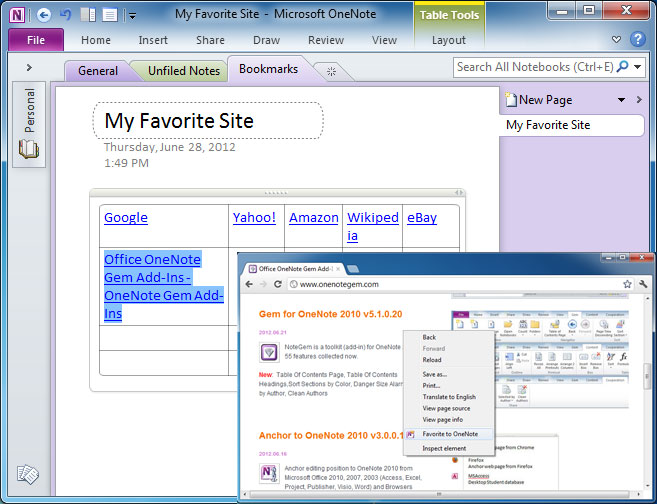
Right click on the web page, and in the popup
context menu, click on "Favorite to OneNote",
this will create a hyperlink with the web page
title in current OneNote page.
2. Bookmark a link's hyperlink to OneNote.
In ie or chrome or firefox, right click on the a
link text, and in the popup context menu, click
on "Favorite to OneNote",
2007 from Browsers (IE, Chrome, Firefox, Opera).
These add-ins extend browsers bookmarks bar. We can
collect and organize a lot of the links with OneNote
now.ccess row.
How to use Favorite to OneNote
1. Bookmark a web page hyperlink to OneNote.
In ie or chrome or firefox, like "Bookmark" button
to bookmark a web page hyperlink.
Right click on the web page, and in the popup
context menu, click on "Favorite to OneNote",
this will create a hyperlink with the web page
title in current OneNote page.
2. Bookmark a link's hyperlink to OneNote.
In ie or chrome or firefox, right click on the a
link text, and in the popup context menu, click
on "Favorite to OneNote",
Program details
Publisher
james lintonE-mail
Contact the publisherPlatforms
Windows XPFile size
1615 KBFile date
8/25/2012License
SharewareInstallation
Install & UninstallRecord updated
8/25/2012
