
Download EDB to PST Converter
Version 3
Commercial Demo
$249.00
1 downloads
Main Features Of EDB to PST Conversion Utility Tool:
1. Supports all versions of MS Outlook 95, 97, 2000,
XP, 2003, 2007 & 2010.
2. Supports Microsoft Exchange 5.0, 5.5, 2000, 2003,
2007 & 2010.
3. Recovers all the data from the folder such as:
emails, journals, calendar, notes, tasks, contacts,
draft, attachments etc. of EDB file.
4. Converts inaccessible database file to MS outlook
PST files
5. Converts multiple mailboxes at the same time
6. Particular user mailbox created in the particular
PST file.
7. Software creates individual folders for emails,
contacts, attachments etc.
8. Search option provided for searching particular EDB
files.
9. A novice and a technical person can use the software
Follow the few simple steps for recovering the corrupt
data back:
1. Download and install the EDB to PST conversion tool.
2. Browse and select the corrupt EDB file.
3. Select the recovery mode.
4. After thorough scanning the recovered items are
displayed.
5. Select the recovered mailboxes and select a desired
location to save the files
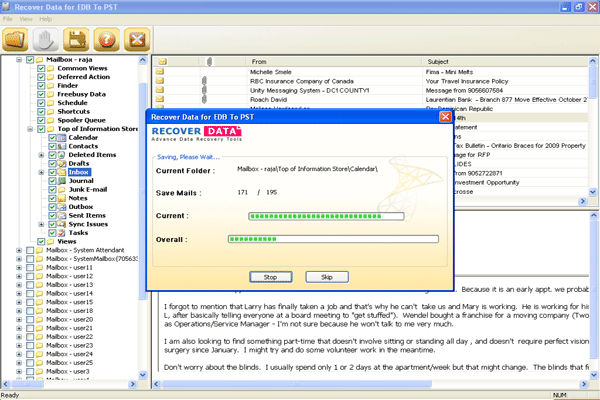
Recover Data for EDB to PST email conversion software
offers online trial version to show the recovery
process of extracting the unusable database files and
make them reusable at Outlook PST. Once you are fully
pleased with the capability of the software buy the
full licensed version
1. Supports all versions of MS Outlook 95, 97, 2000,
XP, 2003, 2007 & 2010.
2. Supports Microsoft Exchange 5.0, 5.5, 2000, 2003,
2007 & 2010.
3. Recovers all the data from the folder such as:
emails, journals, calendar, notes, tasks, contacts,
draft, attachments etc. of EDB file.
4. Converts inaccessible database file to MS outlook
PST files
5. Converts multiple mailboxes at the same time
6. Particular user mailbox created in the particular
PST file.
7. Software creates individual folders for emails,
contacts, attachments etc.
8. Search option provided for searching particular EDB
files.
9. A novice and a technical person can use the software
Follow the few simple steps for recovering the corrupt
data back:
1. Download and install the EDB to PST conversion tool.
2. Browse and select the corrupt EDB file.
3. Select the recovery mode.
4. After thorough scanning the recovered items are
displayed.
5. Select the recovered mailboxes and select a desired
location to save the files
Recover Data for EDB to PST email conversion software
offers online trial version to show the recovery
process of extracting the unusable database files and
make them reusable at Outlook PST. Once you are fully
pleased with the capability of the software buy the
full licensed version
Program details
Publisher
EDB to PST Email MIgration SoftwareE-mail
Contact the publisherPlatforms
Windows 98<br>Windows XPFile size
2422 KBFile date
3/29/2012License
Commercial DemoInstallation
Install & UninstallRecord updated
7/23/2012