
TurboCollage
Version 2.0.0
Shareware
$0.99
0 downloads
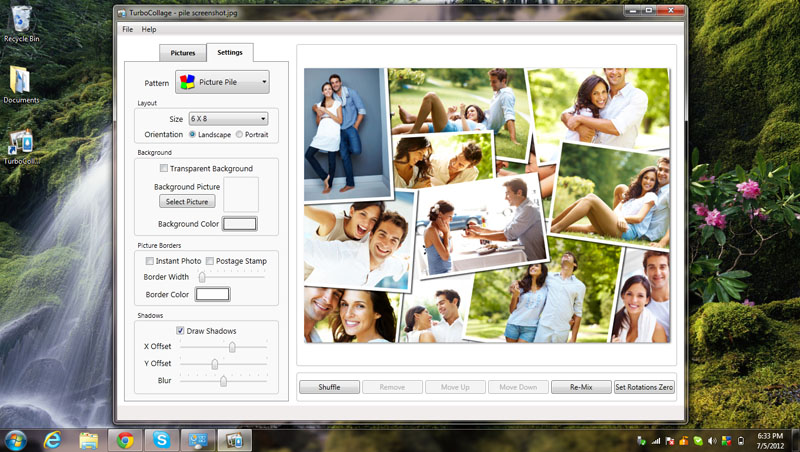
Create stunning picture collages on your Windows PC.
Setup a collage with a prominent center picture,
arrange pictures in a regular grid, or create a random
picture pile. Tie fond memories together into gorgeous
picture mosaics. With an intuitive interface,
TurboCollage gives you complete control over your
collage design.
Simply start by dragging a few pictures into
TurboCollage. Choose a collage style from five
exciting variants. Select from a range of picture
sizes. Select Landscape or Portrait orientation and
use a color or a custom picture as collage background.
You can even use a transparent background for your
collage. Add shadows to pictures to give your collage
a real paper collage feel. Exchange pictures by
dragging one picture on another. Add text to your
collage. Shuffle the collage to get another exciting
layout. TurboCollage even lets you pan and zoom
individual pictures within their frames so that they
are positioned just as you wish.
Setup a collage with a prominent center picture,
arrange pictures in a regular grid, or create a random
picture pile. Tie fond memories together into gorgeous
picture mosaics. With an intuitive interface,
TurboCollage gives you complete control over your
collage design.
Simply start by dragging a few pictures into
TurboCollage. Choose a collage style from five
exciting variants. Select from a range of picture
sizes. Select Landscape or Portrait orientation and
use a color or a custom picture as collage background.
You can even use a transparent background for your
collage. Add shadows to pictures to give your collage
a real paper collage feel. Exchange pictures by
dragging one picture on another. Add text to your
collage. Shuffle the collage to get another exciting
layout. TurboCollage even lets you pan and zoom
individual pictures within their frames so that they
are positioned just as you wish.
Program details
Publisher
SilkenMermaid TechnologiesE-mail
Contact the publisherHome page
http://www.turbocollage.com/Platforms
Windows XPFile size
4080 KBFile date
7/31/2012License
SharewareInstallation
Install & UninstallRecord updated
8/7/2012

