
ClickBook MMX
Version 13.1
Shareware
$49.95
0 downloads
ClickBook, a powerful yet easy-to-use printing utility,
lets you print customized day planner pages, wallet
booklets, brochures, greeting cards, catalogs, banners,
posters, microfiche, and more from Internet, Windows,
or CD-Rom files! ClickBook, helps you scale, rotate,
and duplex your digital photos, favorite on-line
content, or other critical information into 140 plus
mobile and convenient layouts. You can even design
your own custom layouts and save up to 75 percent in
paper costs! Now you can convert files to PDFs. *Use
up to 75 percent less paper! *Walks you through
double-sided printing. *Prints 80 custom booklet
styles! *Rotates, reduces and realigns documents
automatically. *Combine files from different
applications into a single printout *User your copy
machine more effectively by printing files with
ClickBook before making copies. *Offers endless bounds
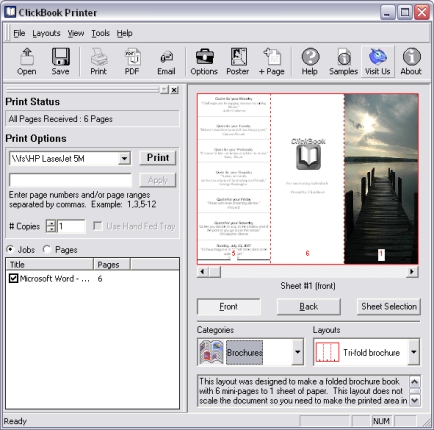
of creativity. How Does It Work? ClickBook intercepts
pages going to laser or inkjet printers and
automatically rotates, reduces and realigns pages into
the correct order to create double-sided booklets and
brochures. ClickBook even prints an instruction sheet
showing exactly how to reinsert paper for double-sided
printing. How do you print with ClickBook? It's
simple, you open the file, graphic or Web page you want
to print. Choose the File, Print command as you
normally would. In the printer dialog you'll select
'ClickBook Printer'. Then ClickBook opens with your
file, you choose a layout, and poof you have a booklet.
What applications does ClickBook work with? ClickBook
works with virtually any Windows application including
Chrome, Internet Explorer, Firefox, AOL, Word, Excel,
Access, WordPerfect, Open Office, Publisher, and
thousands more! Utilizing Adobe Acrobat for Windows you
can effortlessly print PDF's as a book with ClickBook.
lets you print customized day planner pages, wallet
booklets, brochures, greeting cards, catalogs, banners,
posters, microfiche, and more from Internet, Windows,
or CD-Rom files! ClickBook, helps you scale, rotate,
and duplex your digital photos, favorite on-line
content, or other critical information into 140 plus
mobile and convenient layouts. You can even design
your own custom layouts and save up to 75 percent in
paper costs! Now you can convert files to PDFs. *Use
up to 75 percent less paper! *Walks you through
double-sided printing. *Prints 80 custom booklet
styles! *Rotates, reduces and realigns documents
automatically. *Combine files from different
applications into a single printout *User your copy
machine more effectively by printing files with
ClickBook before making copies. *Offers endless bounds
of creativity. How Does It Work? ClickBook intercepts
pages going to laser or inkjet printers and
automatically rotates, reduces and realigns pages into
the correct order to create double-sided booklets and
brochures. ClickBook even prints an instruction sheet
showing exactly how to reinsert paper for double-sided
printing. How do you print with ClickBook? It's
simple, you open the file, graphic or Web page you want
to print. Choose the File, Print command as you
normally would. In the printer dialog you'll select
'ClickBook Printer'. Then ClickBook opens with your
file, you choose a layout, and poof you have a booklet.
What applications does ClickBook work with? ClickBook
works with virtually any Windows application including
Chrome, Internet Explorer, Firefox, AOL, Word, Excel,
Access, WordPerfect, Open Office, Publisher, and
thousands more! Utilizing Adobe Acrobat for Windows you
can effortlessly print PDF's as a book with ClickBook.
Program details
Publisher
Blue SquirrelE-mail
Contact the publisherPlatforms
Windows 98<br>Windows XPFile size
8130 KBFile date
5/5/2010License
SharewareExpires after
15 daysExpiration info
Prints a Blue Squirrel Header and Footer on Trial onlyInstallation
Install & UninstallRecord updated
10/7/2012


