
Win8 Icon Converter
Version 3.0
Shareware
$19.95
1 downloads
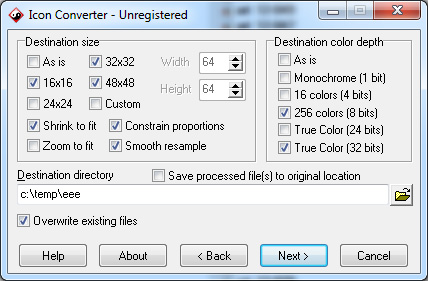
Win8 Icon Converter converts Mac OS icons, BMP, JPEG,
GIF, PNG, PSD, WMF, PCX, TIFF, WBMP, XPM, XBM and CUR
formats into multi-resolution Windows 7 icons. You can
add files and folders from Windows Explorer or other
file shells using drag and drop. You also can paste
bitmaps from the clipboard and change color resolution
and size to create customized icons. It's possible to
convert 256-color icons into True Color icons and vice
versa. Smooth resampling is supported.
Plus, you can break down entire icon libraries into
individual icons. Win8 Icon Converter allows you to
extract icons from folders and libraries and place
them into the directory of your choice.
The application has a wizard interface, making it
simple to process multiple files at once. You can
find many images on the Internet and convert them to
icons for use on your Windows desktop, in applications
and much more.
GIF, PNG, PSD, WMF, PCX, TIFF, WBMP, XPM, XBM and CUR
formats into multi-resolution Windows 7 icons. You can
add files and folders from Windows Explorer or other
file shells using drag and drop. You also can paste
bitmaps from the clipboard and change color resolution
and size to create customized icons. It's possible to
convert 256-color icons into True Color icons and vice
versa. Smooth resampling is supported.
Plus, you can break down entire icon libraries into
individual icons. Win8 Icon Converter allows you to
extract icons from folders and libraries and place
them into the directory of your choice.
The application has a wizard interface, making it
simple to process multiple files at once. You can
find many images on the Internet and convert them to
icons for use on your Windows desktop, in applications
and much more.
Program details
Publisher
Vasily TurgenevE-mail
Contact the publisherPlatforms
Windows 95<br>Windows 98<br>Windows ME<br>Windows File size
5723 KBFile date
6/12/2011License
SharewareInstallation
Install & UninstallRecord updated
10/10/2012


