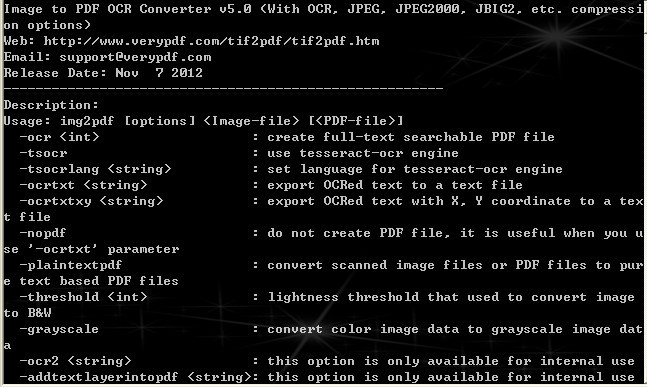

VeryPDF Image to PDF OCR Converter CMD
Version 5.0
Shareware
$399.00
0 downloads
This is the update version of VeryPDF Image to PDF OCR
Converter Command Line. VeryPDF Image to PDF OCR
Converter Command Line allows you to convert image to
PDF document with OCR technology. It also supports to
convert PDF to image file. In addition, the application
supplies several kinds of compression methods for
compressing image.
New update features of VeryPDF Image to PDF OCR
Converter Command Line:
1. Support JBIG2 compression method.
2. Support JPEG2000 compression method.
3. Support types of OCR engines. V5.0 supports OCR
engine of VeryPDF and Tesseract-OCR engine.
4. Optimize created searchable PDF file.
5. Be able to create plain PDF.
6. Be able to create plain Text or the Text with
coordination information.
7. Be able to convert image to PDF or PDF to image.
8. Input file format: PDF, BMP, GIF, TIFF, JPEG, PNG,
PCX and TGA.
9. Input file format: PDF, BMP, GIF, TIFF, JPEG, PNG,
PCX and TGA.
Converter Command Line. VeryPDF Image to PDF OCR
Converter Command Line allows you to convert image to
PDF document with OCR technology. It also supports to
convert PDF to image file. In addition, the application
supplies several kinds of compression methods for
compressing image.
New update features of VeryPDF Image to PDF OCR
Converter Command Line:
1. Support JBIG2 compression method.
2. Support JPEG2000 compression method.
3. Support types of OCR engines. V5.0 supports OCR
engine of VeryPDF and Tesseract-OCR engine.
4. Optimize created searchable PDF file.
5. Be able to create plain PDF.
6. Be able to create plain Text or the Text with
coordination information.
7. Be able to convert image to PDF or PDF to image.
8. Input file format: PDF, BMP, GIF, TIFF, JPEG, PNG,
PCX and TGA.
9. Input file format: PDF, BMP, GIF, TIFF, JPEG, PNG,
PCX and TGA.
Program details
Publisher
VeryPDF VeryPDFE-mail
Contact the publisherPlatforms
Windows 3.x<br>Windows 95<br>Windows 98<br>WindowsFile size
24436 KBFile date
11/21/2012License
SharewareExpiration info
Either/Or - use it foreverInstallation
Install & UninstallRecord updated
11/21/2012

