
Recover Lost File
Version 14.0
Shareware
$49.00
0 downloads
Many things like registry corruption, hard disk
formatting errors, system shut down issues or virus
attacks can make Windows data inaccessible. But you can
recover lost files and folders easily using Kernel for
Windows Data Recovery. It works with FAT 16, FAT 32,
NTFS and NTFS 5 File systems of Windows OS. Also, it
works with devices like devices like IDE, EIDE, SCSI,
SATA, PEN, ZIP, and USB drives.
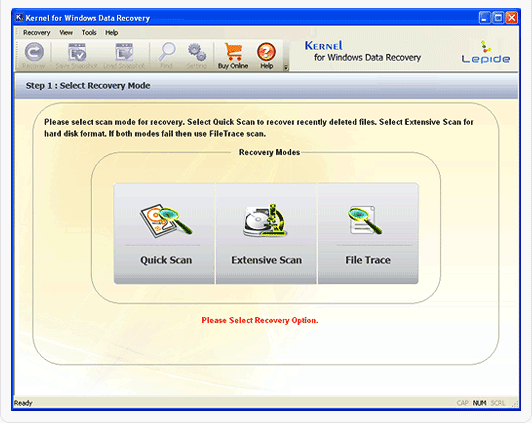
Kernel for Windows Data Recovery owns three robust
recovery modes – Quick Scan, Extensive Scan and File
Trace. Quick Scan, as the name indicates, is a quick
mode for the recovery of data after minor issues. For
more serious issues, one can try Extensive Scan mode.
But the File Trace mode is the most effective one as it
offers complete recovery of data in all situations of
corruption. After you recover lost files using a
suitable mode of Kernel for Windows Data Recovery, you
can preview them to check the accuracy and completeness
of the recovered data. In the preview pane, you can
check each and every item, navigating through various
folders in the folder list.
Before purchasing Kernel for Windows Data Recovery, you
can download the free version of this tool. Do not
forget to check the installation requirements before
downloading. The free version doesn’t have the saving
capacity. But you can avail this facility by purchasing
the full version after the trial. You can get more
details at www.recoverlostfile.net
formatting errors, system shut down issues or virus
attacks can make Windows data inaccessible. But you can
recover lost files and folders easily using Kernel for
Windows Data Recovery. It works with FAT 16, FAT 32,
NTFS and NTFS 5 File systems of Windows OS. Also, it
works with devices like devices like IDE, EIDE, SCSI,
SATA, PEN, ZIP, and USB drives.
Kernel for Windows Data Recovery owns three robust
recovery modes – Quick Scan, Extensive Scan and File
Trace. Quick Scan, as the name indicates, is a quick
mode for the recovery of data after minor issues. For
more serious issues, one can try Extensive Scan mode.
But the File Trace mode is the most effective one as it
offers complete recovery of data in all situations of
corruption. After you recover lost files using a
suitable mode of Kernel for Windows Data Recovery, you
can preview them to check the accuracy and completeness
of the recovered data. In the preview pane, you can
check each and every item, navigating through various
folders in the folder list.
Before purchasing Kernel for Windows Data Recovery, you
can download the free version of this tool. Do not
forget to check the installation requirements before
downloading. The free version doesn’t have the saving
capacity. But you can avail this facility by purchasing
the full version after the trial. You can get more
details at www.recoverlostfile.net
Program details
Publisher
Recover Lost FileE-mail
Contact the publisherHome page
http://www.recoverlostfile.net/Platforms
Win7 x32<br>Win7 x64<br>WinServer<br>Windows XP<br>Windows 98<br>WinVista<br>WinVista x64File size
3225 KBFile date
12/2/2014License
SharewareExpiration info
Installation
Install & UninstallRecord updated
12/2/2014


